A real rack synthesizer in your phone or tablet: three original sound engines, 16 multitimbral parts, an arpeggiator and reggae patterns per part, a 16-track MIDI sequencer. Plug in a USB or Bluetooth keyboard and VIBRANIUM becomes a low-latency MIDI expander.
COMING SOON TO GOOGLE PLAYTest version 0.8 · every feature unlocked · then: Classic free, Premium as a one-time purchase, no subscription
A native audio engine (C++, Oboe) built for live playing, and a plugin-style interface: knobs, a fluorescent green LCD, tabs at the bottom.
VA
Vibranium Classic
Virtual analog: 3 oscillators + sub + noise, up to 4-voice unison, multimode filter (LP24, LP12, BP, HP) with drive, 2 envelopes, 3 LFOs with direct destinations, 6-slot modulation matrix, 7 effects. 16 voices.
FM
Vibranium FM4 PREMIUM
4-operator FM synthesis: 8 algorithms, feedback, 4 waveforms per operator, 4 envelopes, vibrato and tremolo. Electric pianos, bells, FM basses.
DR
Vibranium Drums PREMIUM
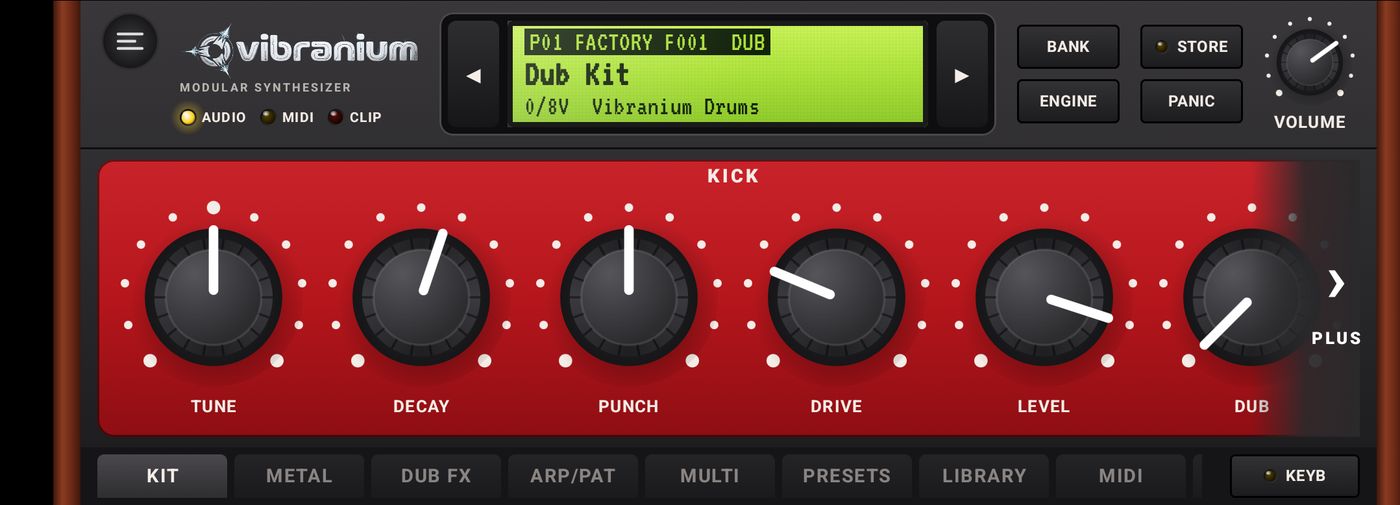
Analog dub drum machine: kick, snare, rim, clap, hi-hats, toms, percussion, each with its own “Dub” send to an echo and a spring reverb.
128
128 factory sounds
Sorted by category (bass, lead, pad, keys, organ, brass, bells, arp, FX, reggae, dub, dancehall), plus a 128-slot user bank.
ARP
Arpeggiator
UP, DOWN, UP/DN, RANDOM, PLAYED, CHORD; 1 to 4 octaves, quarter notes to 32nd notes, gate, swing and latch.
16
16-part Multi PREMIUM
16 simultaneous sounds, one per MIDI channel, each with its own engine, preset, arpeggiator, volume and pan. 6 ready-to-play demos.
PAT
Reggae patterns PREMIUM
Drums (one drop, steppers, rockers, rub-a-dub, dembow), transposable bass lines, guitar skanks and organ bubble played on the held chord.
SEQ
MIDI sequencer PREMIUM
16 tracks, live recording, piano roll with note inspector (length, velocity), guitar and bass tablature, cycle loop, quantize, songs saved by name.
MIX
Studio-style mixer PREMIUM
One channel strip per track: instrument, pan, fader graduated in dB, meter with peak hold and clip indicator, MUTE and SOLO, stereo master out.
AI
AI assistant PREMIUM
Describe a sound in writing or by voice and VIBRANIUM programs it. Offline, local AI on the phone (no key, no Internet), or Claude, OpenAI, Gemini with your own key.
♫
A song from one sentence PREMIUM
“Laid-back dub in A minor”: the AI writes drums, bass, chords, pad, arpeggio and melody in 13 styles, picks the sounds and starts playback. Everything stays editable in the sequencer.
MIDI
MIDI expander
USB keyboards, Bluetooth LE MIDI and a “Vibranium Synth” virtual port for other apps. Sound keeps playing while the app is in the background.
PK
Packs and sharing PREMIUM
Import/export of sounds (.vbrp) and banks (.vbrb), installation of signed Firmware Packs (.synthpack).
ms
Low latency
AAudio through Oboe, automatic buffer that grows when crackles occur, built-in endurance test to check your device's stability.
FX
7 effects per sound
Distortion (7 algorithms), ring modulator / frequency shifter, phaser, chorus, digital or tape delay, reverb and “character” (warmth, vintage, tube, stereo widening, bass boost).
Firmware Packs
More sounds, free
Extra sound banks for the VIBRANIUM engines, in .synthpack format, signed by VIBRANIUM and checked by the app before installation. Sounds licensed CC BY 4.0: free to use, even in commercial productions.
DownloadTap Download on the phone: the file lands in Downloads. Some browsers add “.zip” to the name: that's fine, don't unzip it.
InstallIn VIBRANIUM: LIBRARY tab › INSTALL, pick the file, check the summary, confirm.
PlaySelect the pack's engine: its bank appears after FACTORY and USER A, with the P prefix.
12
Dub Lab
Vibranium Classic · v1.0.0 · CC BY 4.0
12 dub and reggae sounds for Vibranium Classic: basses, stabs, sirens, melodica, pads, tape echoes.
Roots Sub Tape · Rockers Growl · Steppers Pulse · Tape Skank · Spring Stab · Siren Up · Siren Wobble · Melodica Dream · Phased Organ · Echo Chamber Pad · Dread Drone · Lofi Dub Keys
The screenshots show the app in French. The app also exists in English, Spanish, Portuguese, German, Italian, Thai, Russian and Ukrainian: choose LANGUAGE in the SETUP tab.
1Getting started
VIBRANIUM is used in landscape. On launch, the audio engine starts and the last sound you used is reloaded: the AUDIO light turns yellow.
Play the on-screen keyboard, or plug in a USB MIDI keyboard (it is detected automatically).
Change sounds with the ◀▶ arrows on either side of the LCD, or pick one in the PRESETS tab.
Change sound engine with ENGINE: Classic, FM4, Drums…
Turn the knobs to shape the sound, then STORE to save it in your bank.
A note is stuck? PANIC immediately stops every note of every part.
2The rack and the LCD
The rack: control strip at the top, engine panels in the middle, keyboard and tab bar at the bottom.
Top strip
Element
Role
Menu button ☰
Opens the side menu: sequencer, AI, Premium, licenses.
AUDIO · MIDI · CLIP lights
AUDIO: engine running. MIDI: blinks when MIDI messages arrive. CLIP: the output is clipping, lower the volume.
LCD
Shows the part, bank, number and category of the sound, its name, then the number of active voices and the engine. A * after the name means the sound was modified and not saved. Tap the screen to switch to the AUDIO (sample rate, latency, CPU load, xruns) and MIDI (connected sources, events received) pages.
◀▶
Previous / next sound in the current bank.
BANK
Goes to the next bank (FACTORY, USER A…) on its first non-empty sound.
ENGINE
Changes the sound engine of the selected part.
STORE
Saves the current sound in the user bank (name, category, slot). Its light turns on when the sound has been modified.
PANIC
Stops all playing notes.
VOLUME
Master volume of the instrument.
Tab bar
The first tabs are the pages of the loaded engine (for example OSCFILTERMODMATRIXFX for Classic). Then come the common tabs: ARP/PATMULTIPRESETSLIBRARYMIDISETUP. Swipe the bar horizontally to see the last ones. On the right, KEYB shows or hides the keyboard to give the panels the full height.
3Knobs and keyboard
Knobs
Drag up to increase, down to decrease. The full travel is about three and a half times the knob's height, for fine control.
Double tap: back to the default value.
While you turn it, the LCD shows the parameter name and its exact value (Hz, ms, cents, %…).
Bipolar parameters (detune, envelope amount, modulation) start from the centre.
When panels extend past the right edge of the screen, a white › MORE arrow appears on the right: tap it (or swipe the page) to see the rest. All rows scroll together; the arrow disappears once you reach the end.
Keyboard
The keyboard: two octaves, C3 / C4 markers, played key highlighted in violet.
Two octaves, playable with several fingers; the played key goes down and lights up in violet. C keys show their octave (C3, C4…).
OCT + / OCT - shift the keyboard by one octave; the starting note (C3…) is shown between them.
BEND: pitch bend wheel, springs back to centre. MOD: modulation wheel (routable in the matrix).
With the TOUCH VELOCITY option (SETUP tab), the bottom of the key plays loud and the top plays soft.
4Vibranium Classic engine (virtual analog)
The free engine, 16-voice polyphonic. The signal flows through the oscillators, the mixer, the filter then the amplifier, before the effects.
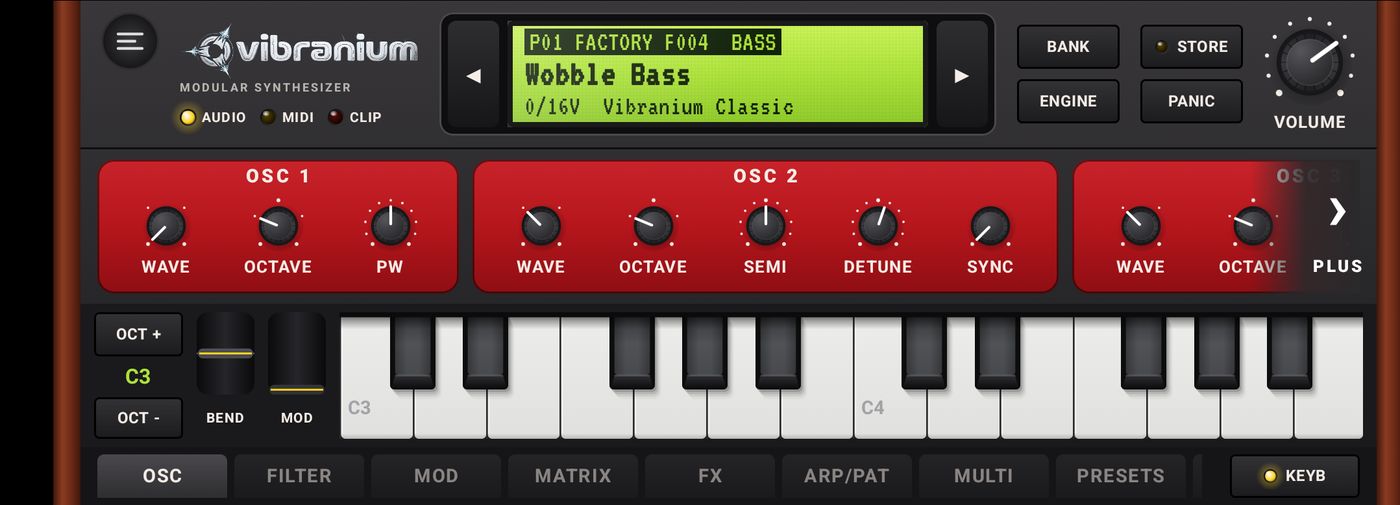
OSC tab
Section
Parameters
OSC 1
Wave (SAW, SQUARE, TRI, SINE), Octave (-2 to +2), PW (pulse width of the square wave).
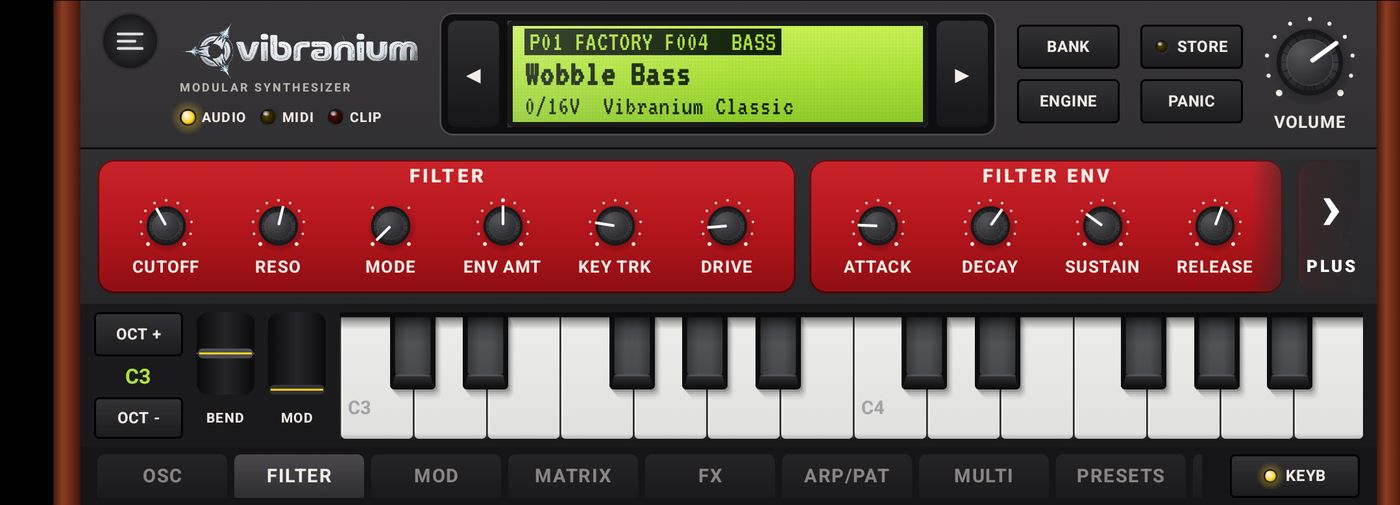
Attack, Decay, Sustain, Release of the filter envelope.
AMPLIFIER
Attack, Decay, Sustain, Release of the volume envelope, and the sound's Volume.
MOD tab
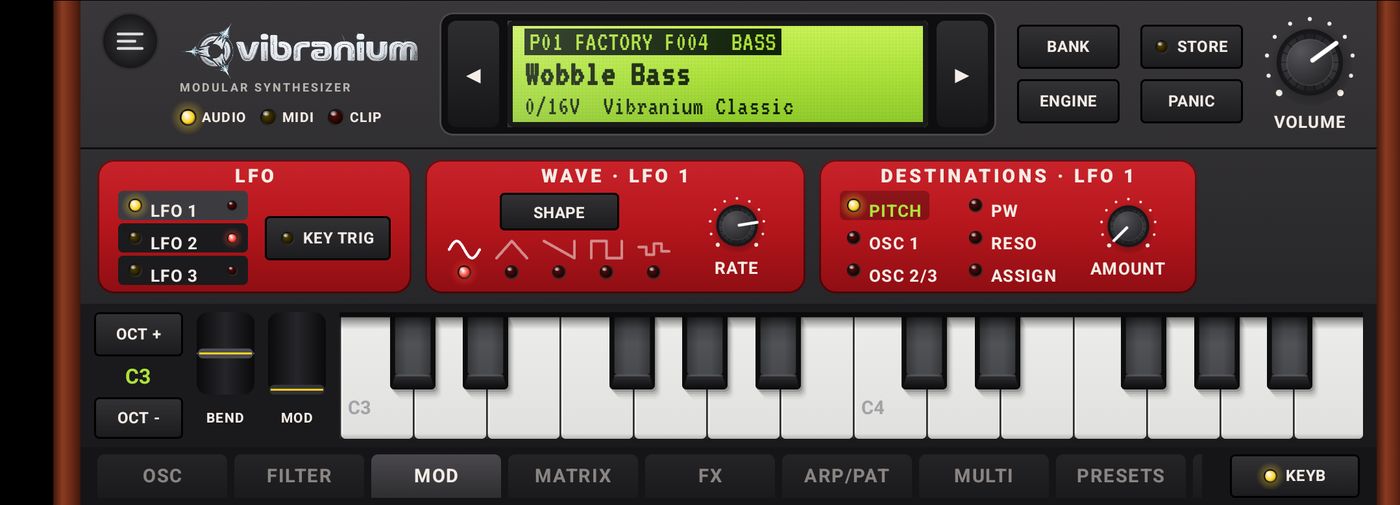
The LFO panel: pick the LFO on the left, its shape and speed in the middle, its destinations on the right.
Three LFOs (low-frequency oscillators) make the sound move: vibrato, wah, tremolo, stereo sweeps… The tab reads left to right, like a synth panel:
LFO: the LFO 1LFO 2LFO 3 buttons select the displayed LFO (yellow light). The small red dot shows an LFO is already modulating something. KEY TRIG restarts the LFO on each note; when off, it runs freely.
WAVE: SHAPE steps through the shapes; you can also tap an icon directly: sine, triangle, saw, square, S&H (random steps). RATE sets the speed (0.02 to 20 Hz).
DESTINATIONS: tap a destination (yellow light), then set its amount with AMOUNT; the LCD shows the value. A red light marks a destination already in use. Amounts are positive or negative (the LFO acts normally or inverted).
LFO
Destinations
LFO 1
PITCH (vibrato on the whole sound), OSC 1, OSC 2/3 (pitch of a single oscillator: moving detune effects), PW (pulse width), RESO (filter resonance), ASSIGN.
PITCH (second vibrato, e.g. slower or faster than LFO 1), ASSIGN.
ASSIGN: one free destination per LFO. Select ASSIGN, choose the target with the DEST knob (pitch, oscillator level, cutoff, pan, speed of another LFO…), then the amount with AMOUNT; the chosen target is shown next to the light.
On a phone, the › MORE arrow appears if the panels don't fit the width.
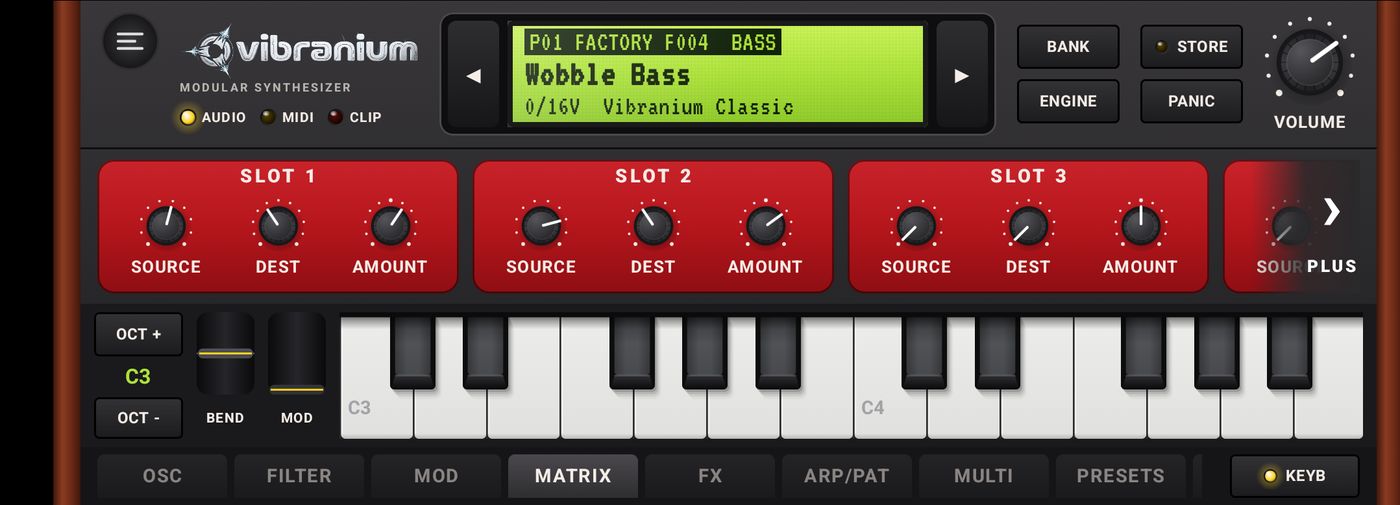
MATRIX tab
Six free modulation slots. Each slot connects a Source (OFF, LFO 1, LFO 2, F.ENV, A.ENV, VELO, KEY, MODWH, PRESS, LFO 3) to a Dest (pitch, pitch of one oscillator, PW, cutoff, resonance, speed of LFO 1, 2 and 3…) with a positive or negative Amount. By default, velocity opens the filter and the MOD wheel opens it further.
FX tab
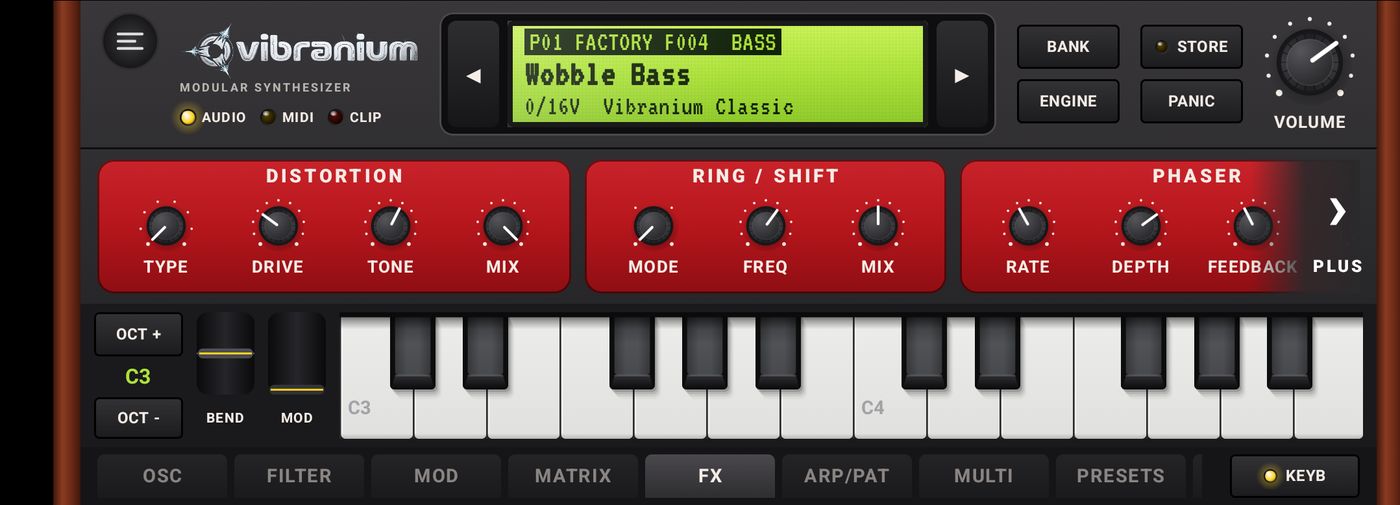
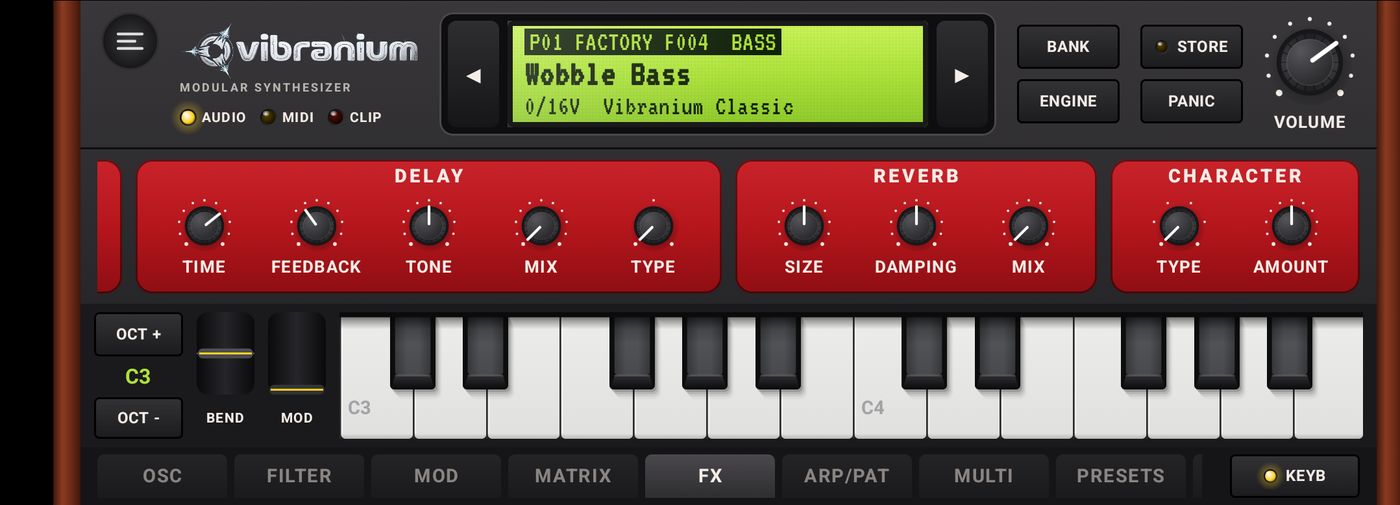
Seven effects per sound, all in this tab. On a phone, tap › MORE to scroll to the last panels. Every effect is neutral by default (Type OFF or Mix at 0): it costs nothing until you use it.
Start of the page (in signal order), MORE arrow on the right.End of the page: delay, reverb and character.
The panels are laid out in the order the sound flows through them: distortion → ring / shift → phaser → chorus → delay → reverb → character.
Section
Settings
DISTORTION
Type: SOFT (gentle saturation), HARD (clipping), FUZZ (heavily saturated, nearly square), ASYM (asymmetric, warm), FOLD (wavefolding, metallic tones), BITS (bit reduction, 16 → 2 bits), DECIM (sample-rate reduction). Drive: intensity. Tone: dark to bright. Mix: blend with the dry sound.
RING / SHIFT
Mode: RING (ring modulation: bell-like, robotic sounds), SHIFT+ / SHIFT- (shifts every frequency up or down: inharmonic tones; with a Freq of a few Hz, a rotating phasing effect). Freq: 1 Hz to 5 kHz. Mix.
PHASER
Rate, Depth, Feedback (deepens the notches), Mix. Six stages, stereo (left and right offset). Perfect on pads, keys and funky sounds.
CHORUS
Rate, Depth, Mix. Thickens and widens the sound.
DELAY
Time (10 ms to 1.9 s), Feedback, Tone, Mix and Type:
DIGITAL, clean repeats;
TAPE, tape echo: when you turn Time, the head slowly glides to the new time and the pitch of the repeats bends (Doppler effect); slight wow, soft saturation, darker and darker repeats;
WARP, worn tape: deep wow, unstable sound, ideal for lo-fi.
REVERB
Size, Damping, Mix.
CHARACTER
Final coloration. Type: WARM (rounded lows, softened peaks), VINTAGE (tape saturation and softened highs), TUBE (tube saturation, even harmonics), WIDE (stereo widening, lows kept in the centre), BASS+ (bass boost, audible even on a small speaker). Amount: intensity.
Ideas: a bass with DISTORTION ASYM and CHARACTER BASS+; a pad with a slow PHASER and CHARACTER WIDE; a lead with DELAY TAPE, turning Time while playing; a bell with RING / SHIFT in RING mode around 300 Hz.
5Vibranium FM4 engine PREMIUM
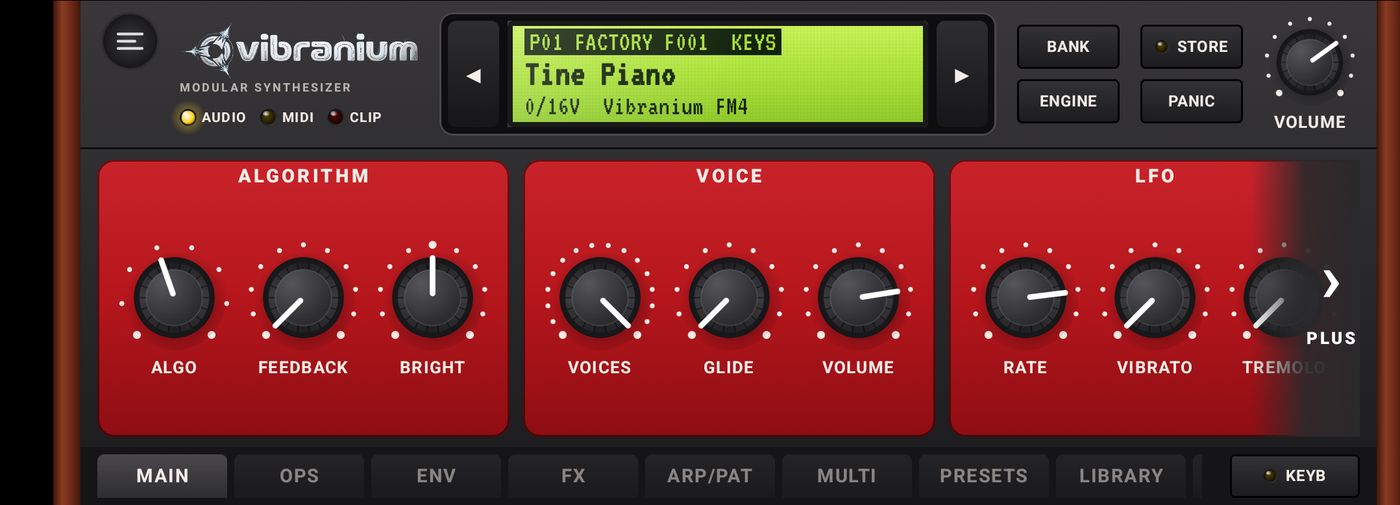
4-operator frequency-modulation synthesis, 16 voices. Ideal for electric pianos, bells, punchy basses and metallic pads.
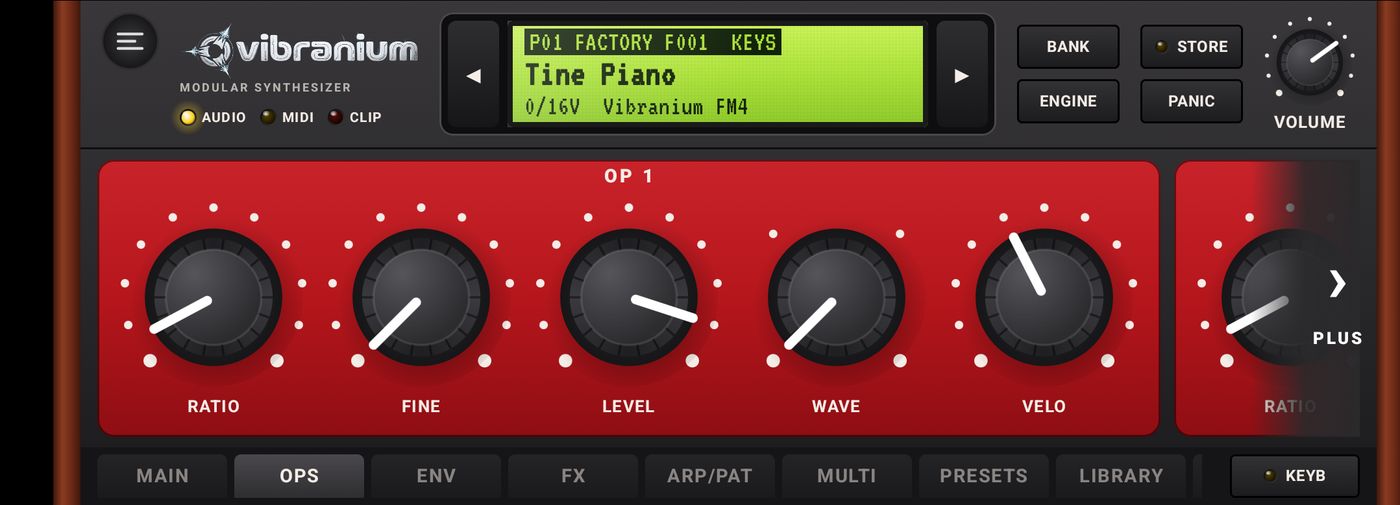
For each operator OP 1 to OP 4: Ratio (frequency ratio), Fine (fine tuning), Level, Wave (SINE, HALF, ABS, PULSE), Velo (velocity sensitivity).
ENV
ENV 1 to ENV 4: one Attack, Decay, Sustain, Release envelope per operator. The modulators' Decay sets the “percussive” attack of the tone.
FX
The seven effects of the Classic engine: chorus, delay (DIGITAL, TAPE, WARP), reverb, distortion, ring / shift, phaser and character.
6Vibranium Drums engine PREMIUM
An analog drum machine designed for reggae and dub, 8 voices. Each instrument is played by a keyboard note (General MIDI layout) and has a Dub send to the echo and the spring reverb.
DUB ECHO: Time, Feedback, Tone, Return and Type (DIGITAL, TAPE, WARP; TAPE gives the typical dub tape echo). SPRING: Size, Damping, Return. MASTER: Drive, Volume.
Dub tip: raise the Dub of the snare and the rim, set DUB ECHO to Type TAPE, push Feedback towards 70 % and play with Time and Tone during the tune: the repeats slide like on a real tape echo.
7Arpeggiator and patterns (ARP/PAT tab)
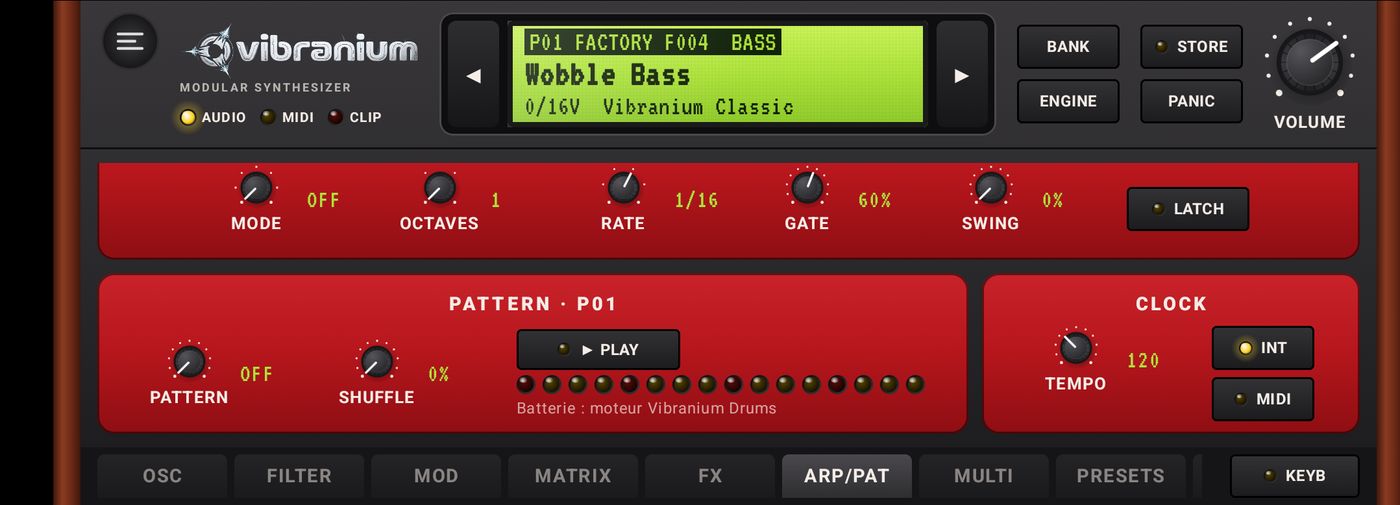
ARPEGGIATOR
Each part (P01 to P16) has its own arpeggiator. On a phone, hide the keyboard with KEYB to see the whole page; with the keyboard shown, the page scrolls vertically.
Setting
Values
Mode
OFF, UP, DOWN, UP/DN (up and down without repeating the ends), RANDOM, PLAYED (playing order), CHORD (repeated chord).
Octaves
1 to 4.
Rate
1/4, 1/8, 1/8T, 1/16, 1/16T, 1/32.
Gate
Note length, 5 to 100 %.
Swing
Delays the off-beats, up to 75 %.
LATCH
The arpeggio keeps going after you release the keys.
PATTERN PREMIUM
One-bar rhythms (16 steps) played by the part, with ► PLAY and a row of LEDs following the current step. Shuffle adds swing.
Drums (Drums engine): ONE DROP, ONE DROP 2, STEPPERS, ROCKERS, RUB-A-DUB, DEMBOW.
Bass: BASS ROOTS, ONE DROP, DUB, SUB, STEPPERS, ROCKERS, RUB-A-DUB, DANCEHALL. The note played on the keyboard transposes the riff.
Chords: SKANK ONE DROP, SKANK DOUBLE, SKANK STEPPERS, SKANK DANCEHALL, ORGAN BUBBLE, ORGAN SKANK, ORGAN ROCKERS. Play a chord (A minor by default): it is remembered and the pattern replays it.
CLOCK
Tempo in BPM. INT: internal clock. MIDI: follows the external MIDI clock and its Start/Stop messages (the tempo then shows EXT).
8Multi mode (16 parts) PREMIUM
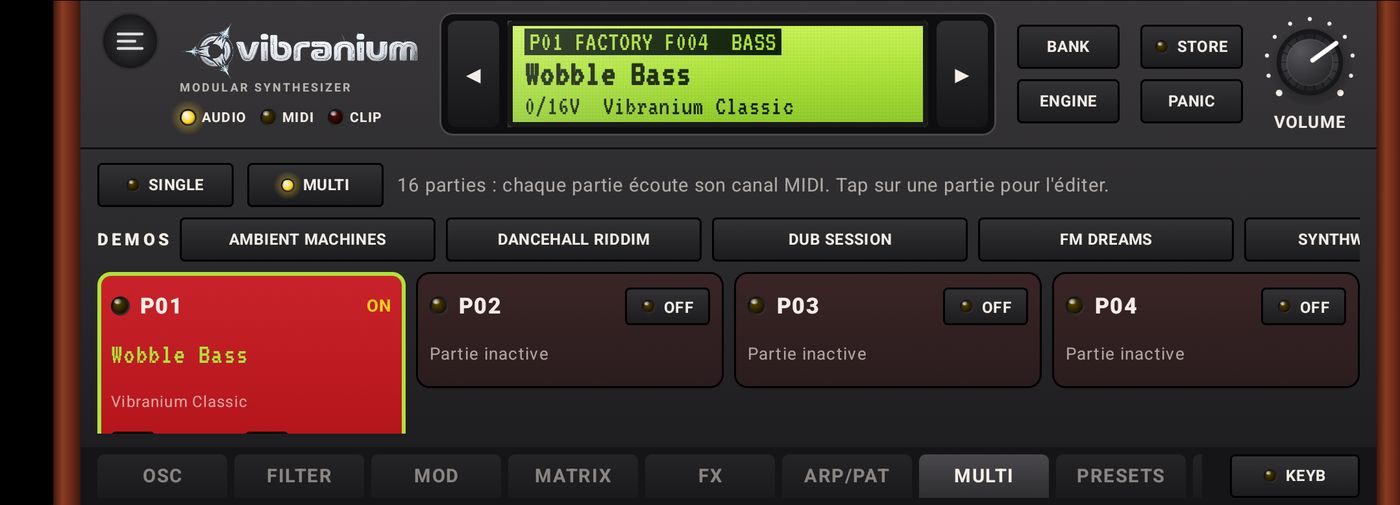
MULTI mode: demos at the top, then one card per part (engine, sound, MIDI channel, volume, pan).
SINGLE: a single sound that answers every MIDI channel.
MULTI: 16 parts, each listening to its own MIDI channel. Tap a part to select it: the engine tabs, ARP/PAT and PRESETS then apply to it.
On each card: ON/OFF, sound name, engine and active pattern or arpeggio, MIDI channel (◀ CH ▶), volume Vol and pan Pan.
DEMOS: Ambient Machines, Dancehall Riddim, Dub Session, FM Dreams, Synthwave Night, Trance Rig. A demo replaces the current multi.
9Presets and banks
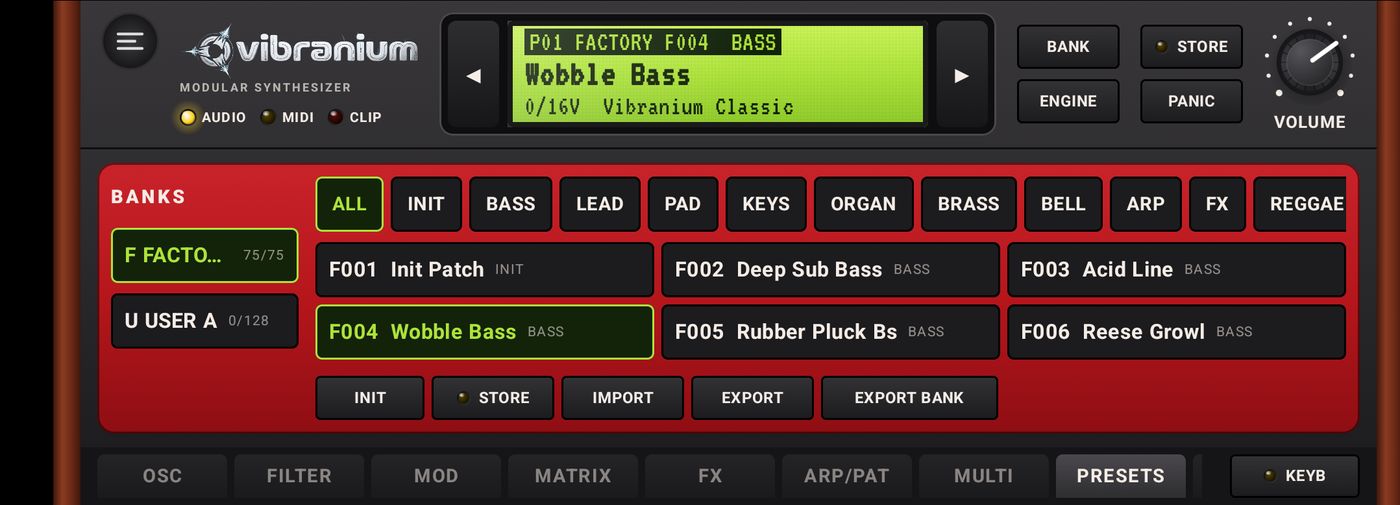
BANKS (left): F FACTORY, the read-only factory sounds; U USER A, your 128 slots. The counter shows how many slots are used.
Categories: ALL, INIT, BASS, LEAD, PAD, KEYS, ORGAN, BRASS, BELL, ARP, FX, REGGAE, DUB, DANCEHALL. Tap one to filter the list.
Tap a sound to load it into the selected part.
INIT: start again from a neutral sound. STORE: save into USER A.
IMPORTPREMIUM: a .vbrp file (one sound) is loaded into the part; a .vbrb file (a bank) is copied into the free slots of USER A, nothing is overwritten.
EXPORT / EXPORT BANKPREMIUM: share one sound or a whole bank.
Factory sounds: 75 for Classic, 33 for FM4, 9 Drums kits, plus a few demo sounds.
To discover the effects, try these at the end of the bank: Fuzz Bass, Acid Fold, Tape Echo Lead, Phaser Strings, Barber Pad, Ring Bell, Lofi Keys and Tape Dub Stab (Classic); Phaser EP, Warp Bells and Shift Chime (FM4); Tape Dub Kit (Drums).
10Library and Firmware Packs
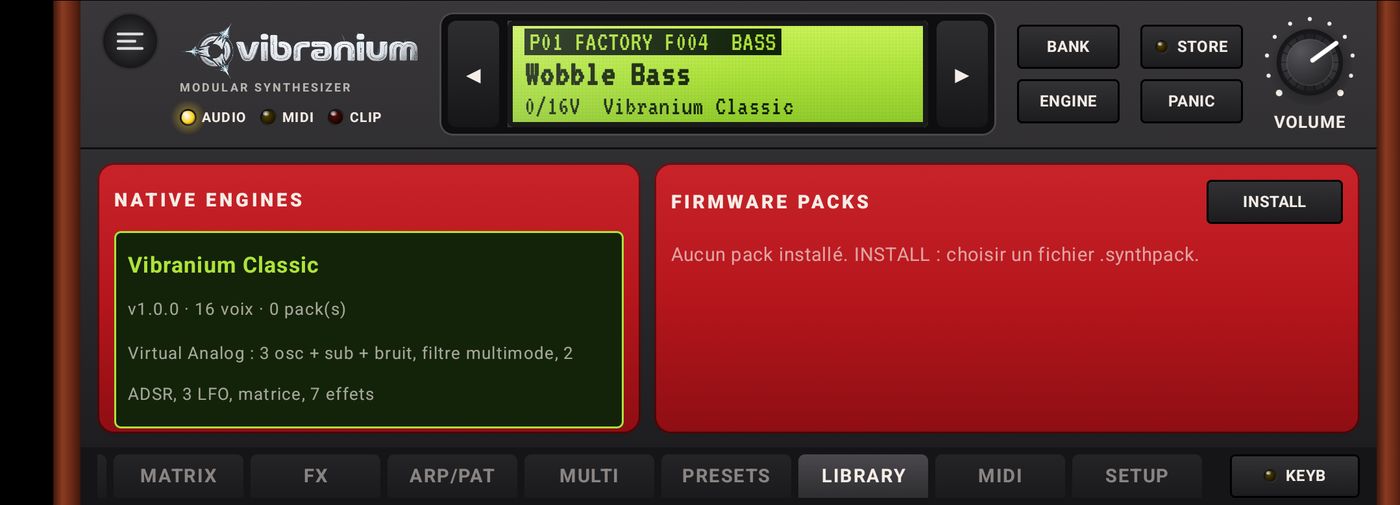
NATIVE ENGINES lists the built-in engines, with their version, polyphony and number of related packs. Tap one to load it.
FIRMWARE PACKSPREMIUM: INSTALL opens a .synthpack file. VIBRANIUM checks its signature and content, then shows a summary (name, author, version, content) before installing; an invalid pack is rejected. A pack can add sound banks for the existing engines, and be updated to a newer version.
Free packs are offered above, in the Firmware Packs section: Dub Lab, FM Crystal, Drum Sessions and Essentials Vol.1.
11MIDI
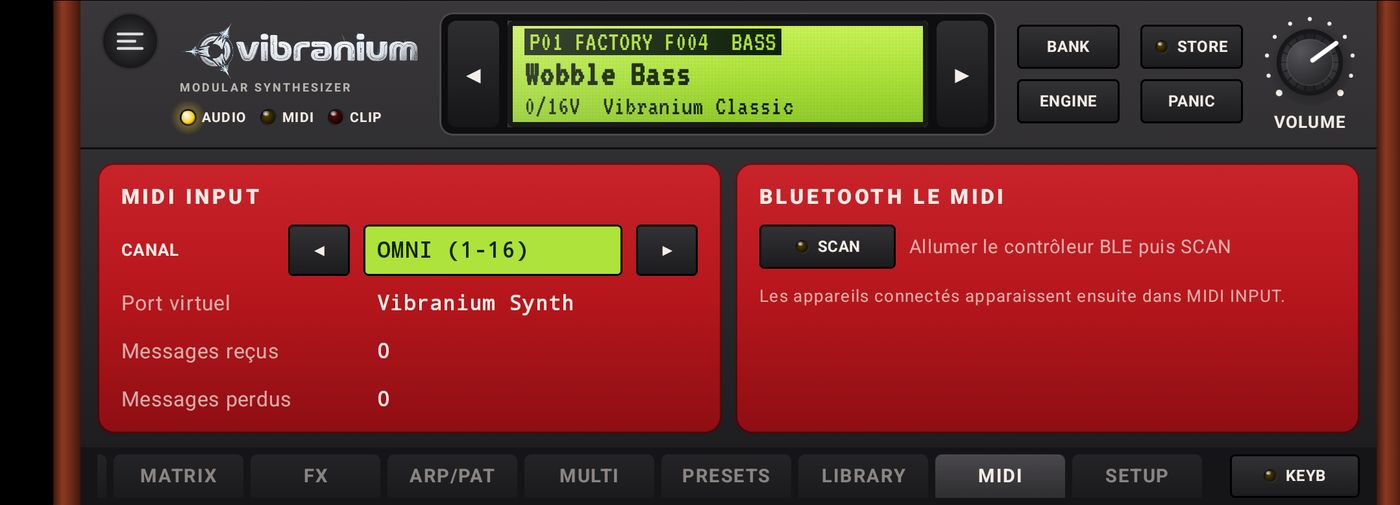
MIDI INPUT
CHANNEL: OMNI (1-16) or a specific channel, for SINGLE mode.
USB keyboard: plug it in (with an OTG adapter if needed), it appears in the list of sources.
From a computer (DAW, software sequencer): connect the phone over USB and set its USB mode to “MIDI”: tap the Android notification “… via USB” (often at the bottom of the shade, among the silent notifications), then choose MIDI. The computer then sees a MIDI device (on Mac: “USB MIDI Device”): select it as the MIDI output in your software.
“Vibranium Synth” virtual port: other MIDI apps on the device (sequencers, DAWs) can play VIBRANIUM directly.
Messages received / lost: diagnostic counters.
BLUETOOTH LE MIDI
Switch on the Bluetooth controller, tap SCAN, then CONNECT on the device found. It then appears under MIDI INPUT. Android asks for the “Nearby devices” permission the first time.
VIBRANIUM responds to notes, velocity, pitch bend, the modulation wheel (CC1), aftertouch (PRESS in the matrix), MIDI clock and Start/Stop.
12Audio setup
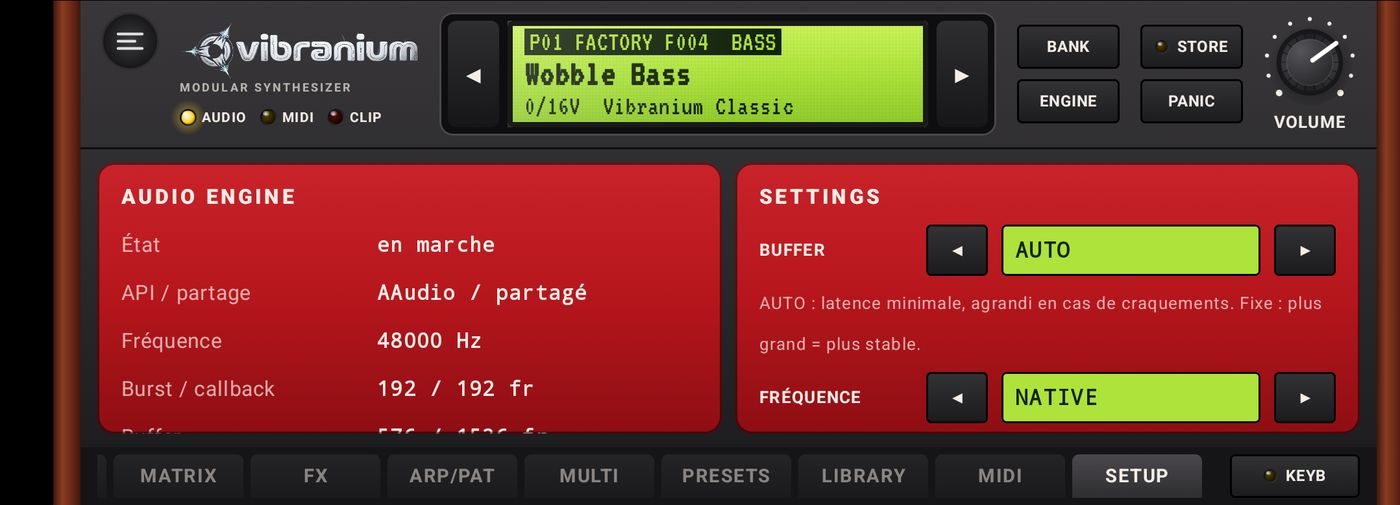
AUDIO ENGINE (information)
Status, API (AAudio or OpenSL ES; exclusive or shared), sample rate, burst, buffer size, output latency, audio thread, active voices, average and peak CPU load, xruns (dropouts).
STRESS 60 s runs a one-minute endurance test: the 16 parts play together with arpeggios and held chords, then a report tells whether the device held up without crackles.
SETTINGS
Setting
Advice
BUFFER
AUTO (recommended): lowest latency, enlarged automatically when crackles occur. A larger fixed value is more stable, but slower to respond.
SAMPLE RATE
NATIVE uses the device's rate (often 48 kHz): the best choice.
BACKGROUND EXPANDER
Sound and MIDI keep running when the app is hidden (a notification stays visible). Essential to drive VIBRANIUM from another app.
TOUCH VELOCITY
Where you touch the key sets the velocity: bottom of the key = loud, top = soft.
LANGUAGE
AUTO follows the phone's language; or choose Français, English, Español, Português, Deutsch, Italiano, ไทย, Русский, Українська.
PDF MANUAL opens this manual as a PDF (Internet connection required); LICENSES shows the open-source licenses.
13MIDI sequencer PREMIUM
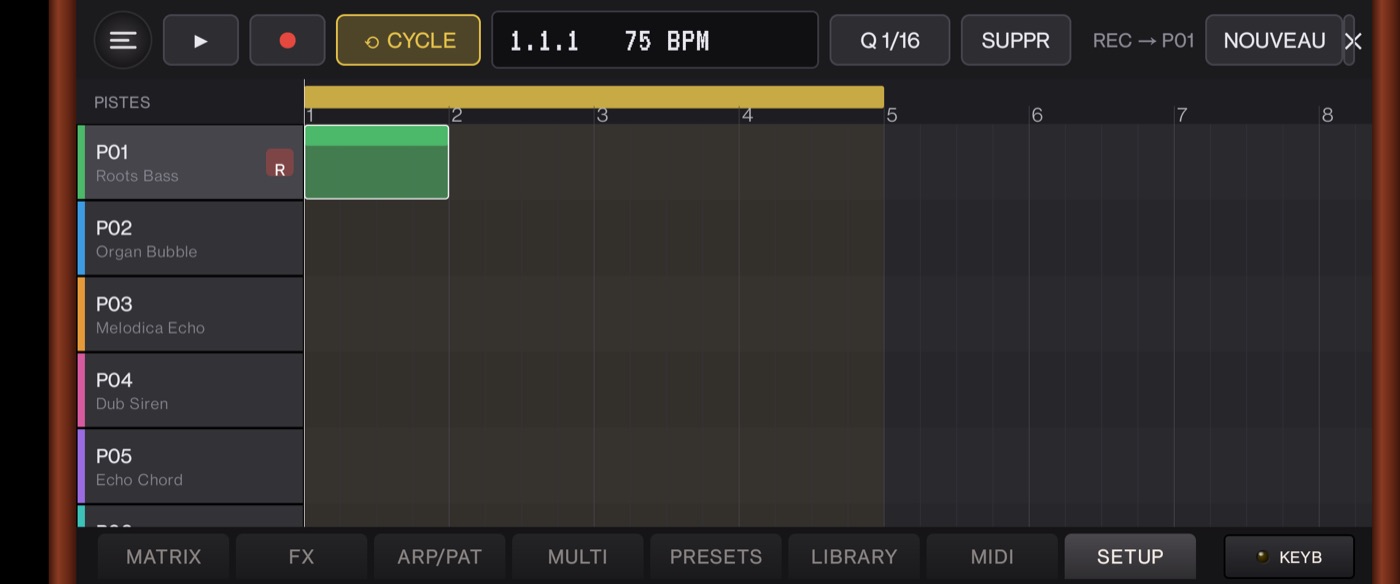
Arrange view: one track per part, the loop area in yellow.
Open it from the ☰ menu › MIDI sequencer. Its 16 tracks match the 16 parts of Multi mode, each showing its sound name.
Transport bar
► play / stop; ● record on the armed track (REC → P01, the selected track, marked R).
CYCLE: loops the yellow area of the ruler.
Position display (bar.beat.step) and tempo.
Q 1/16: quantizes the notes of the selected region to 16th notes.
DEL: deletes the selected region. NEW: new empty project. ✕: back to the synthesizer.
MIXER: shows or hides the mixing desk. SONGS: save, open and share songs.
Regions
Tap an empty area: creates a one-bar region.
Tap a region: selects it. Drag: moves it (including to another track). Drag the right edge: changes its length.
Double tap: opens the editor under the arrangement.
Editor: piano roll and tablature
PIANO: tap an empty area = add a note, tap a note = select it, drag = move, right edge = length (snapped to 32nd notes).
TAB GTR and TAB BASS: the same notes shown as guitar (6 strings) or bass (4 strings) tablature, to find a riff on the neck.
Note inspector
When a note is selected, a bar shows its pitch and position, then:
LENGTH: − / + step to the previous or next grid value; shortcuts 1/321/161/81/8.1/41/21 bar2 bars. An off-grid length is shown as “≈ 1/8”.
→ ALL: gives this length to every note of the region.
VEL.: − / + set the note's velocity.
DEL: deletes the note.
Mixer
MIXER opens a studio-style mixing desk, one channel strip per active track:
instrument slot (the part's sound) and pan knob;
fader graduated in dB;
post-fader meter, with a 2-second peak hold and a red clip indicator;
MUTE silences the track, SOLO plays only that one (several solos allowed); these states are saved with the session;
coloured track name, and on the right the Stereo Out / MASTER strip.
Songs
SONGS opens the list of your songs. A song keeps everything: sounds and mix of the 16 tracks, tempo and sequencer notes.
Type a name then SAVE (REPLACE if the name already exists).
OPEN loads a song in place of the current one: save it first to keep it. DEL deletes it after confirmation.
EXPORT FILE / IMPORT FILE: share a song (.vbrsong file) with another device.
The current project is also saved automatically.
14AI assistant PREMIUM
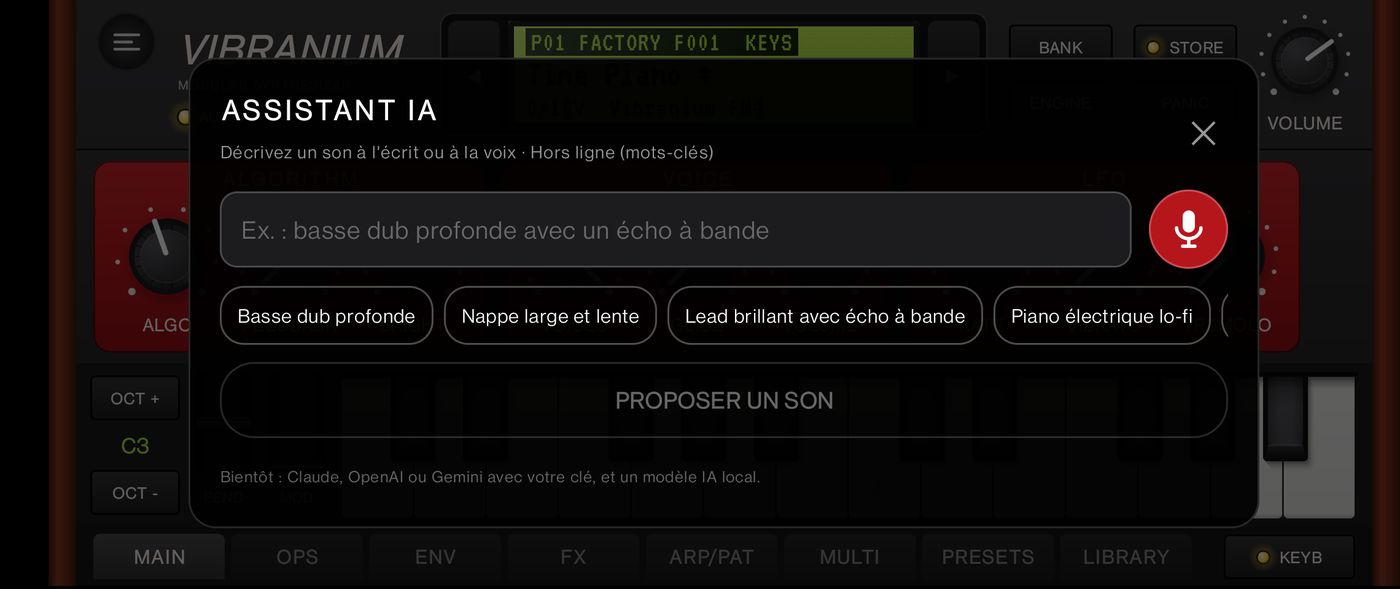
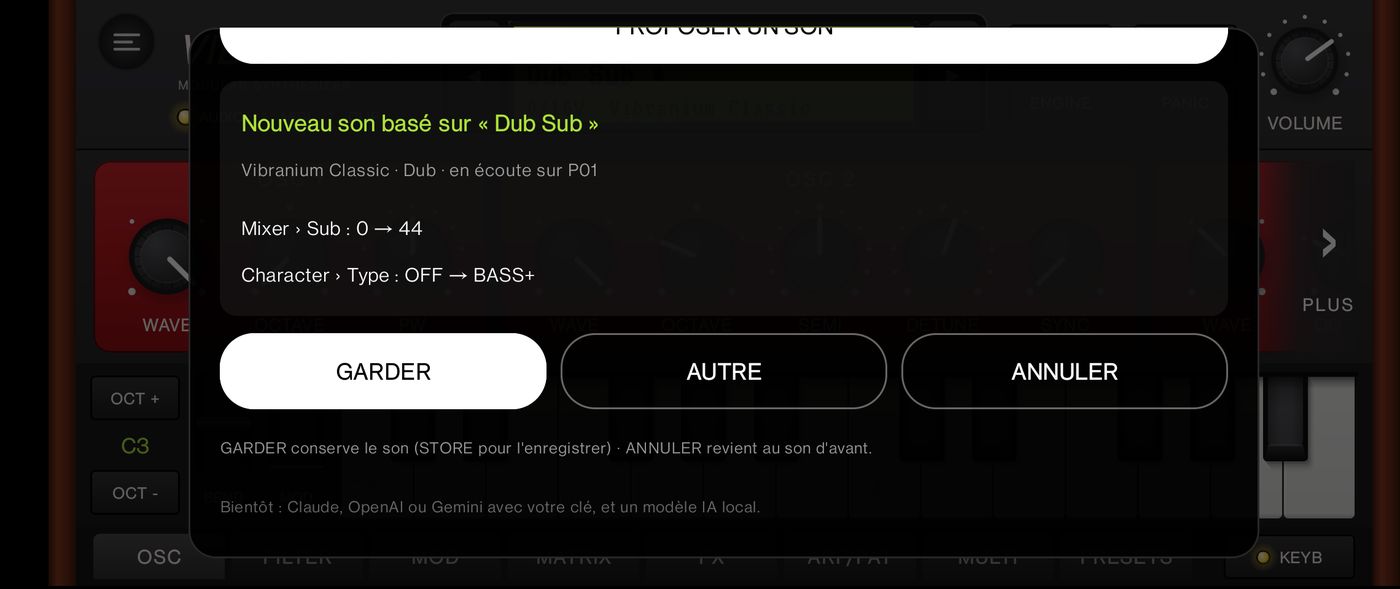
Type your request or tap the red microphone to dictate it.The suggested sound is already playing; the list shows what changed.
Describe a sound in your own words, typed or spoken, and VIBRANIUM programs it for you. Open it from the ☰ menu › AI assistant. At the top, choose A SOUND or A SONG (see below).
Type: write your request then SUGGEST A SOUND (or the keyboard's Send key).
Speak: tap the red microphone and say your request; it is written into the field and sent automatically. Dictation uses Android's speech recognition (Google); VIBRANIUM does not request microphone access.
Suggestions: tap a ready-made idea (“Deep dub bass”, “Wide slow pad”, “Darker”…).
Two kinds of requests
A new sound: name a type of sound, and optionally a style and qualities — “deep dub bass”, “wide slow pad”, “bright lead with tape echo”, “dub drums with lots of echo”, “lo-fi electric piano”. The assistant starts from the closest factory sound, then tweaks it.
Tweak the current sound: without a sound type, the request applies to the loaded sound — “brighter”, “a bit darker”, “add a phaser”, “no reverb”, “wider”, “glide”.
Nuances understood: very, a bit, less, without. The offline mode knows sound types (bass, lead, pad, piano, organ, brass, bells, arpeggio, drums, siren…), styles (reggae, dub, dancehall), qualities (bright, dark, warm, deep, fat, wide, dry, slow, percussive, long…) and effects (echo, tape, reverb, distortion, fuzz, lo-fi, phaser, metallic, vibrato, wobble, tremolo). The AI modes understand any language.
Listen, keep or cancel
The suggested sound is loaded right away on the selected part: play to hear it. The panel shows the starting sound and the list of changed settings.
KEEP keeps the sound (marked modified: STORE to save it in your bank).
ANOTHER suggests a variant (another starting sound, or a stronger tweak).
CANCEL goes back exactly to the previous sound.
Choose who answers
At the top of the panel, Answer: offers five modes.
Mode
How it works
Offline
Default. Instant, free, nothing leaves the phone: a built-in vocabulary picks the closest factory sound and tweaks it.
Local AI
A real AI (Qwen2.5 1.5B, Apache 2.0 license) running on the phone: free-form requests, no key, no Internet and no cost once the model is downloaded (1.1 GB). ⬇ = model not installed yet. The first request takes about a minute (model loading), the next ones a few seconds. Hidden if the phone's processor is not supported.
Claude (Anthropic)
A real AI understands much freer, more nuanced requests (“a round King Tubby bass that breathes a little”), picks the engine and sets filter, envelopes, LFOs and effects, then explains what it did in one sentence. You need your own API key for the service; each request is billed to your account (a few cents at most with the most powerful models).
OpenAI
Gemini (Google)
Add a key: tap the mode you want (🔑 = key missing) or ⚙ AI settings. Choose the service, tap Get an API key to create it on the service's website, paste it, choose the model then SAVE.
Privacy: your keys are encrypted on the phone (Android Keystore) and only sent to the service concerned. In Claude, OpenAI or Gemini mode, your request and the settings of the current sound are sent to that service; in Offline and Local AI modes, nothing leaves the phone. VIBRANIUM has no intermediate server. To remove a key: ⚙ AI settings › DELETE KEY.
Possible messages: key rejected (check it), credit or quota reached on your account, too many requests (wait a moment), no connection.
Installing the local AI
☰ menu › Install local AI (or the Local AI ⬇ mode in the assistant). DOWNLOAD fetches the model once: 1.1 GB, Wi-Fi recommended, app open. An interrupted download (STOP, network loss) resumes where it stopped. Once installed, the menu shows Local AI: installed ✓; USE selects it, DELETE frees the space.
Create a song with AI
In A SONG mode (or ☰ menu › Create a song with AI), describe a song in one sentence then COMPOSE A SONG: “Laid-back dub in A minor”, “Happy house at 124 BPM”, “Dark steppers with lots of echo”, “Chill lo-fi for studying”… Works with every answer mode, including Offline.
The AI picks tempo, key, chord progression, form (intro, verse, chorus, bridge, drop, outro), instruments and their sounds; VIBRANIUM then writes the notes: drums with fills, a bass that follows the chords, skank or held chords, pad, arpeggio and a melody repeated in every chorus.
What you specify is always respected: style, tempo (“90 BPM”), key, minor/major, “no drums”.
Each instrument gets its own part (sound, volume, pan), and playback starts at once. The panel sums up style, tempo, key, progression, form, length and the sound of each part.
KEEP opens the song in the sequencer, where every note stays editable; ANOTHER composes a variant; CANCEL restores your previous sounds and project.
15Menu and Premium
The ☰ menu slides in from the left; tap outside it to close it.
STUDIO: MIDI sequencer (or back to the rack), AI assistant, Create a song with AI, Install local AI (or “Local AI: installed ✓”).
PREMIUM: the list of Premium features, Unlock everything (one-time Google Play purchase, no subscription) and Restore my purchases (new device, reinstall).
Classic engine, its 75 sounds, user bank, arpeggiator, USB / Bluetooth / virtual MIDI, background mode.
FM4 and Drums engines, 16-part Multi, patterns and demos, MIDI sequencer, mixer, songs, AI assistant (sounds and songs, local AI), import/export, Firmware Packs.
Current test version: every Premium feature is unlocked for testers until the Google Play release.
16Troubleshooting
I hear crackles
Leave BUFFER on AUTO or choose a larger value, lower the polyphony (Voices) or the unison, close heavy apps. Check the xruns on the AUDIO page of the LCD.
My MIDI keyboard doesn't play anything
Check that it appears in the MIDI tab and that the MIDI light blinks when you play. In SINGLE mode, set CHANNEL to OMNI; in MULTI mode, check the part's channel (CH).
My computer can't play VIBRANIUM over USB
The phone must be in USB MIDI mode. By default, many phones switch to “charging” or “file transfer” every time they are plugged in: no MIDI port is created and the computer sees nothing. Pull the notification shade all the way down: the system notification is called something like “Charging this device via USB” or “USB mode”; it is often among the silent notifications. Tap it: the USB Preferences screen opens, choose MIDI.
Without a notification, the screen is also in the settings, with the phone plugged in: depending on the brand, Connected devices › USB, or Developer options › Default USB configuration (the latter makes it permanent; developer options are enabled by tapping “Build number” 7 times in About phone). The mode often goes back to “charging” at each unplug: redo it after each connection unless you made it permanent.
Then, in your software, choose the MIDI output matching the phone (on Mac: “USB MIDI Device”). In VIBRANIUM's MIDI tab, the source USB · Android USB peripheral port appears and the “Messages received” counter goes up when you play. As long as no source is connected, the MIDI tab reminds you of this setting.
The CLIP light comes on
The output is clipping: lower VOLUME, the part volumes in Multi mode or the Drive.
The sound stops when I switch apps
Turn on BACKGROUND EXPANDER in SETUP.
A note is stuck
PANIC.
I lost my Premium purchase
☰ menu › Restore my purchases, with the same Google account used for the purchase.