Short lessons to follow with your phone in hand: edit a sound and store it in your bank, build a pad from scratch, a psytrance bass and lead, a pad with the Wave engine, then a full techno track in the sequencer. The values given are starting points: then adjust by ear. The screenshots show the app in French; button names in the text are those of the English interface.
1The basics: edit a sound and save it
10 min · Classic engine · free
The fastest way to learn synthesis: start from a factory sound, change it by ear, then keep it in your bank.
Load a sound
Open the PRESETS tab, tap the PAD category, then Warm Pad. (Faster: the ◀▶ arrows on each side of the LCD.)
Play a chord: the sound is loaded into the selected part (P01).
Edit it
FILTER tab: lower CUTOFF while holding the chord, the sound gets darker. While you turn a knob, the LCD shows its exact value (Hz, ms, %).
In AMPLIFIER, raise RELEASE to about 3 s: notes fade out even more slowly after you let go.
FX tab: raise the DELAYMix to about 25 % to add an echo.
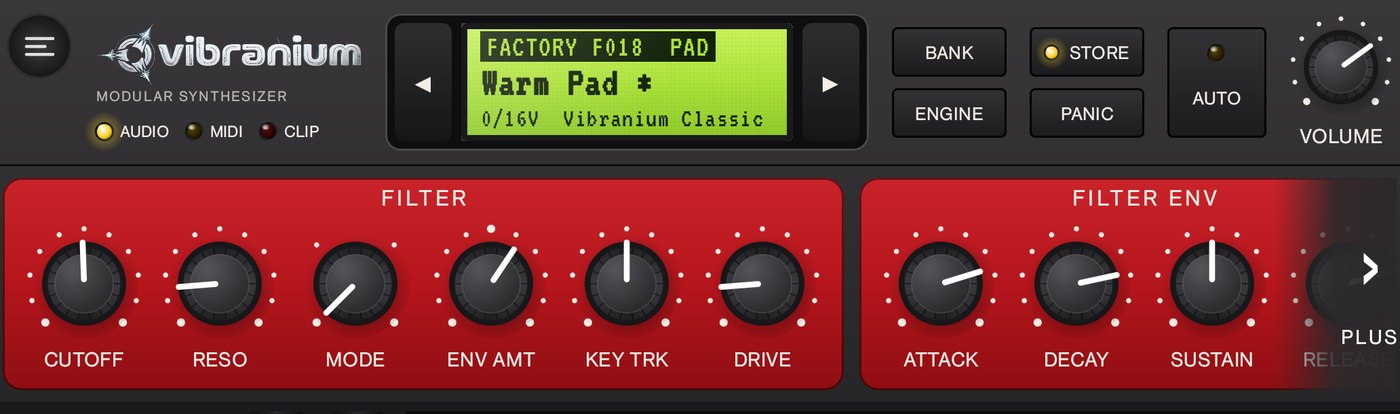
Edited Warm Pad: the star after the name and the STORE LED show the sound is not saved yet. (App shown in French.)
As soon as you change something, the STORE LED lights up and the sound name gets a star on the screen (Warm Pad *): the sound is edited but not saved yet.
Lost with a setting? A double tap on a knob puts it back to its original value. To undo everything, reload the sound with ◀ then ▶.
Save it (STORE)
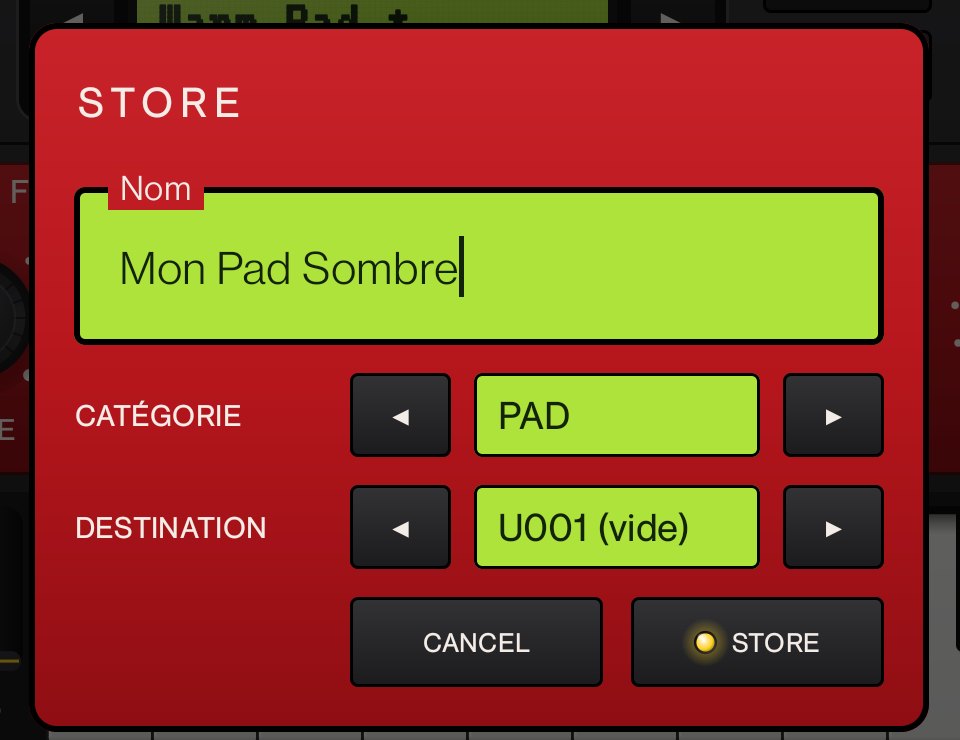
Tap STORE. The STORE window opens.
Name: type a name (16 characters max), for example My Dark Pad.
CATEGORY: ◀▶ to PAD (the sound will be listed with the pads in the category filter).
DESTINATION: pick a slot of the USER A bank (U001 to U128). A free slot shows (empty); otherwise the message “The existing sound will be replaced” warns you.
Tap STORE: the screen confirms STORED U001 and the LED goes off.
The STORE window: name, category and free slot U001 of the USER A bank (French interface: Nom = Name, vide = empty).
Find and manage your sounds
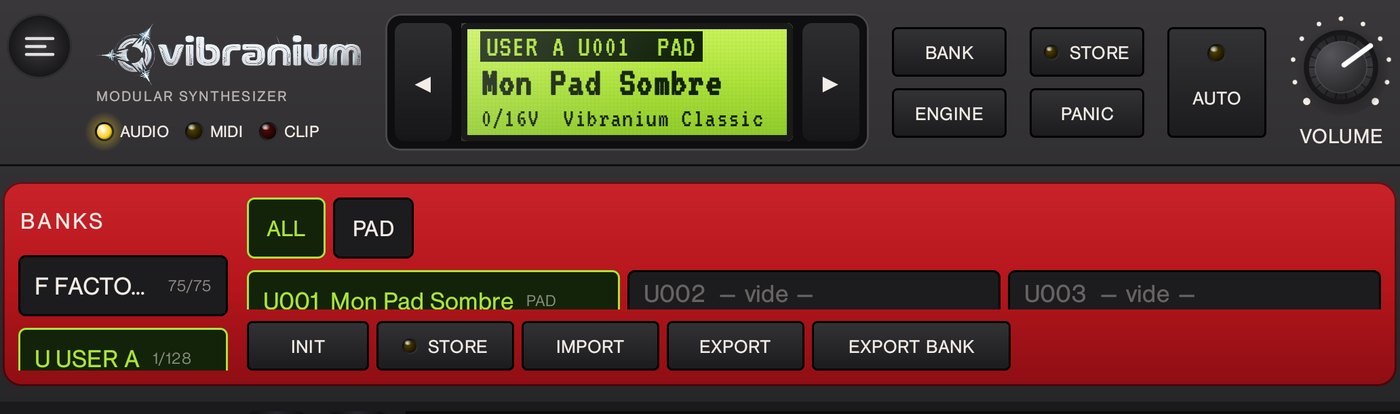
After STORE: the sound sits in U001 of USER A, the screen shows USER A U001.
PRESETS tab, BANKS column: tap U USER A to see your sounds. The BANK button in the top bar also switches banks.
Keep two versions: edit your sound and save it to another slot under another name (My Dark Pad 2).
Update: save to the same slot, the old version is replaced.
SharePREMIUM: EXPORT creates a .vbrp file (one sound), EXPORT BANK a .vbrb file (the whole bank), to send to another user who opens them with IMPORT.
2From scratch: your first pad
15 min · Classic engine · free
This time we start from a neutral sound to understand what each block does: oscillators → filter → envelopes → effects.
Blank sound: PRESETS tab, tap INIT. The sound goes back to neutral: two sawtooths (Osc 1 and a slightly detuned Osc 2), a little chorus and reverb.
Thicken (OSC tab): in MIXER, raise Osc 2 to the same level as Osc 1 (80 %). In OSC 2, set Detune to about +10 cents (7 to start with): the two slightly detuned oscillators “beat” and the sound widens.
Soften (FILTER tab): Cutoff about 1.5 kHz, Reso about 10 %, Env Amt about 20 %.
Let it breathe: in AMPLIFIER, Attack about 0.8 s (the sound fades in), Sustain at maximum, Release about 1.5 s. In FILTER ENV, Attack about 1 s: the filter opens as the volume rises.
Add space (FX tab): CHORUS Mix about 40 %, REVERB Size about 70 % and Mix about 35 %. Optional: CHARACTER set to WIDE for an even wider stereo image.
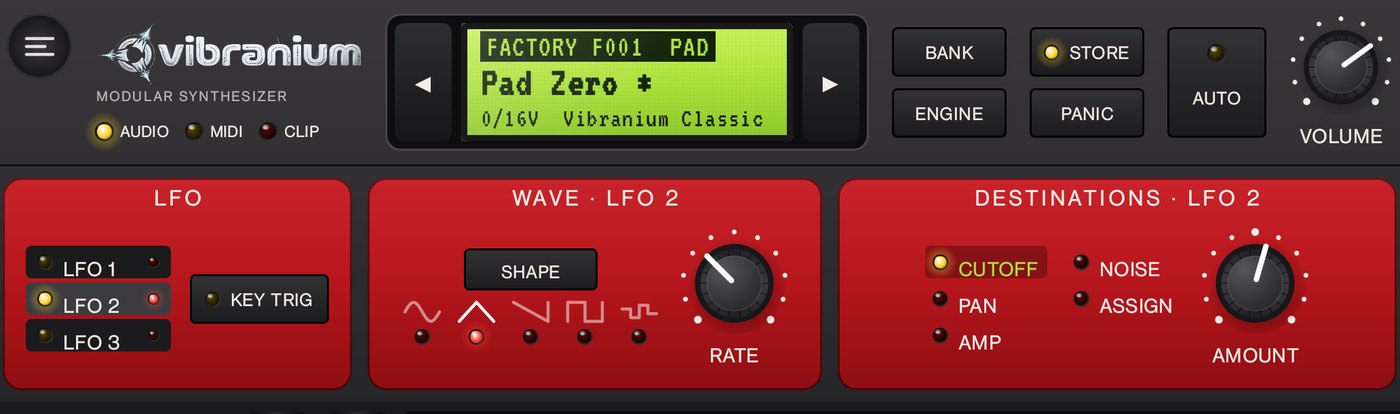
Add movement (MOD tab): pick LFO 2, triangle shape, RATE about 0.2 Hz, destination CUTOFF with a small AMOUNT (10 to 15 %): the pad slowly opens and closes.
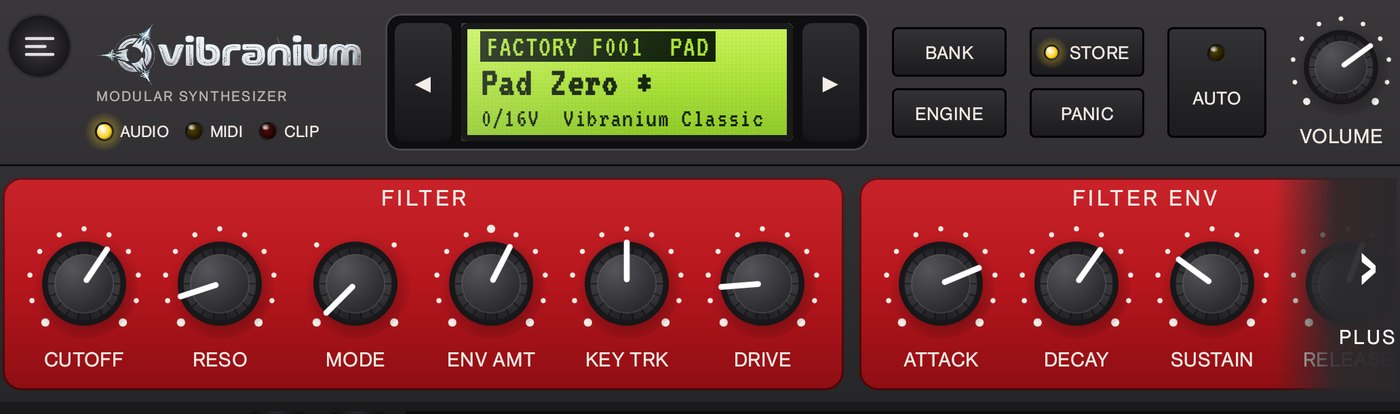
Play held chords, then save with STORE: name Pad Zero, category PAD.
The rule of thumb: oscillators = the raw material, filter = the colour, envelopes = the shape over time, LFO = the movement, effects = the space.
3A rolling psytrance bass
15 min · Classic engine + arpeggiator · free
The typical psytrance bass: very short notes, in sixteenths, around 145 BPM, with a filter snap on every note. We build it, then make it roll with the arpeggiator.
The sound
PRESETS › INIT.
OSC tab: OSC 1 Wave SAW. In MIXER, Osc 2 to 0 (a single oscillator, tighter) and Sub about 40 % for low-end weight. In VOICE, Voices set to 1 (monophonic: each note cuts the previous one, the sound stays tight).
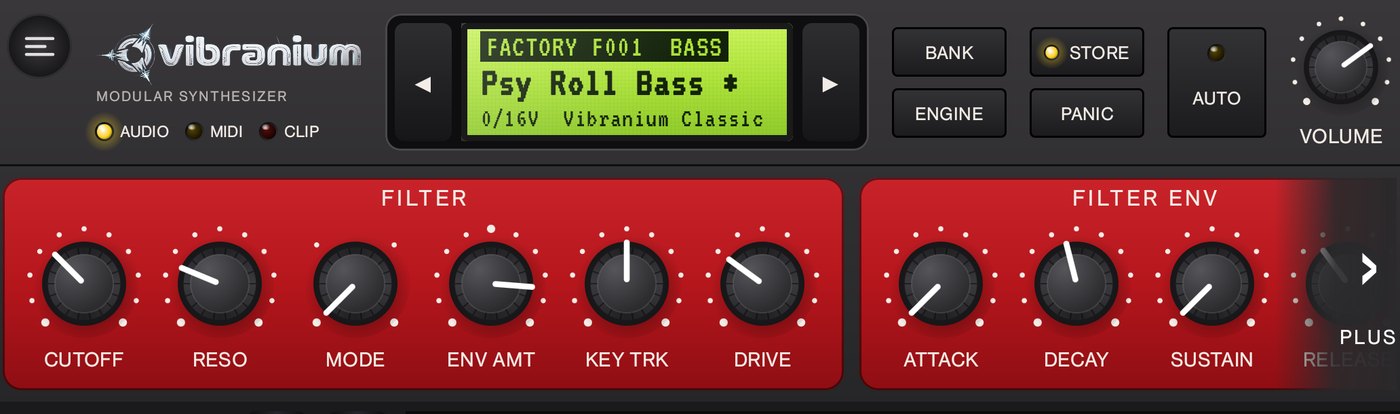
FILTER tab: Mode LP24, Cutoff about 200 Hz, Reso about 25 %, Env Amt about +70 %, Drive about 30 %.
FILTER ENV: Attack at minimum, Decay about 150 ms, Sustain at 0, Release about 80 ms. That's the “knock” of each note.
AMPLIFIER: Attack at minimum, Decay about 180 ms, Sustain at 0, Release about 60 ms: dry notes that don't overlap.
FX tab: CHORUS Mix and REVERB Mix to 0. A bass stays dry, otherwise the low end gets blurry.
Psy Roll Bass: closed filter (low Cutoff), high Env Amt, short filter envelope.
Make it roll
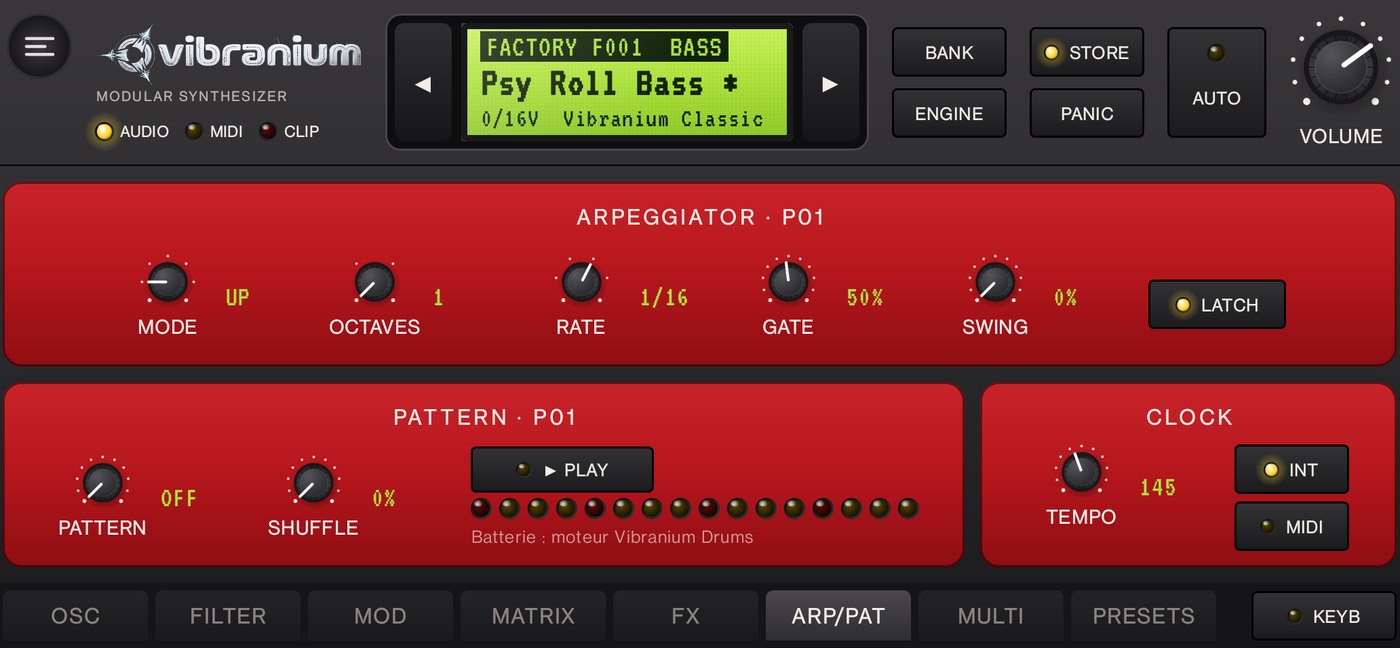
ARP/PAT tab, CLOCK section: tempo 145 BPM.
ARPEGGIATOR section: Mode UP, Octaves 1, Rate 1/16, Gate about 50 %, LATCH on.
Move the keyboard down with OCT - to C1 and tap E1 (low E, the classic psytrance key). The bass keeps rolling on its own thanks to LATCH.
While it plays, sculpt it: shorter FILTER ENV Decay = more percussive, longer = rounder; higher Reso = more acid; Cutoff sets the brightness.
STORE: name Psy Roll Bass, category BASS.
The bass arpeggiator: UP, 1 octave, 1/16, Gate 50 %, LATCH on, tempo 145.
In a real track the psy bass leaves room for the kick: it plays the 2nd, 3rd and 4th sixteenths of each beat, the kick takes the 1st. You can write that exact pattern in the sequencer (lesson 6): four beats × three notes, length 1/16.
4A psytrance acid lead
10 min · Classic engine · free · follows lesson 3
We turn the bass into a squelchy high line, typical of psytrance build-ups.
Load Psy Roll Bass from USER A.
FILTER tab: Reso about 70 %, Cutoff about 600 Hz, Env Amt about +50 %. FILTER ENV: Decay about 300 ms.
OSC tab: in MIXER, Sub to 0 (useless up high).
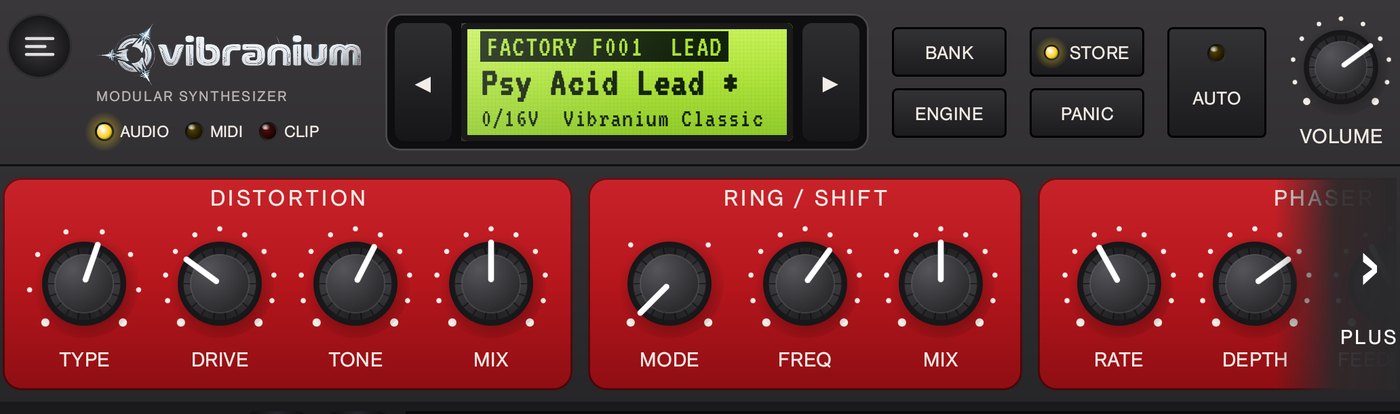
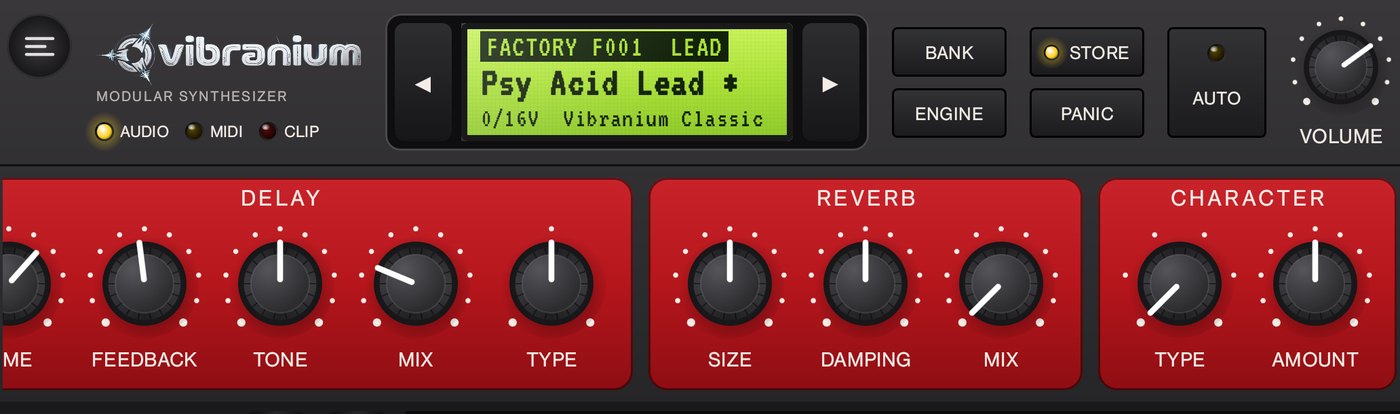
FX tab: DISTORTION Type ASYM, Drive about 30 %, Mix about 50 %; DELAY Type TAPE, Time about 0.31 s (dotted eighth at 145 BPM), Feedback about 45 %, Mix about 25 %.
ARP/PAT tab: Mode RANDOM, Octaves 2, Rate 1/16. With OCT +, go back up to C3 and hold E3 + G3 + B3: the arpeggio picks notes of the chord at random.
The build-up move: slowly turn Cutoff up over 8 bars, then drop it at once. To record it into the sound, use AUTO (see the manual, chapter 2).
STORE to another slot: name Psy Acid Lead, category LEAD. Your bass stays untouched.
Psy Acid Lead, FX tab: DISTORTION set to ASYM (Type), Drive 30 %, Mix 50 %.End of the FX page (› MORE): TAPE DELAY, Time 0.31 s, Feedback 45 %, Mix 25 %.
5An evolving vocal pad (Wave engine) PREMIUM
20 min · Vibranium Wave engine
The Wave engine plays wavetables: 16 waveform frames in a row, scanned with the position. Moving the position changes the timbre continuously. We build a pad whose “vowels” glide on their own while you hold the chord.
The oscillators
Tap ENGINE until the LCD shows Vibranium Wave: the first factory sound, Init Wave, loads (a single oscillator, ANALOG table).
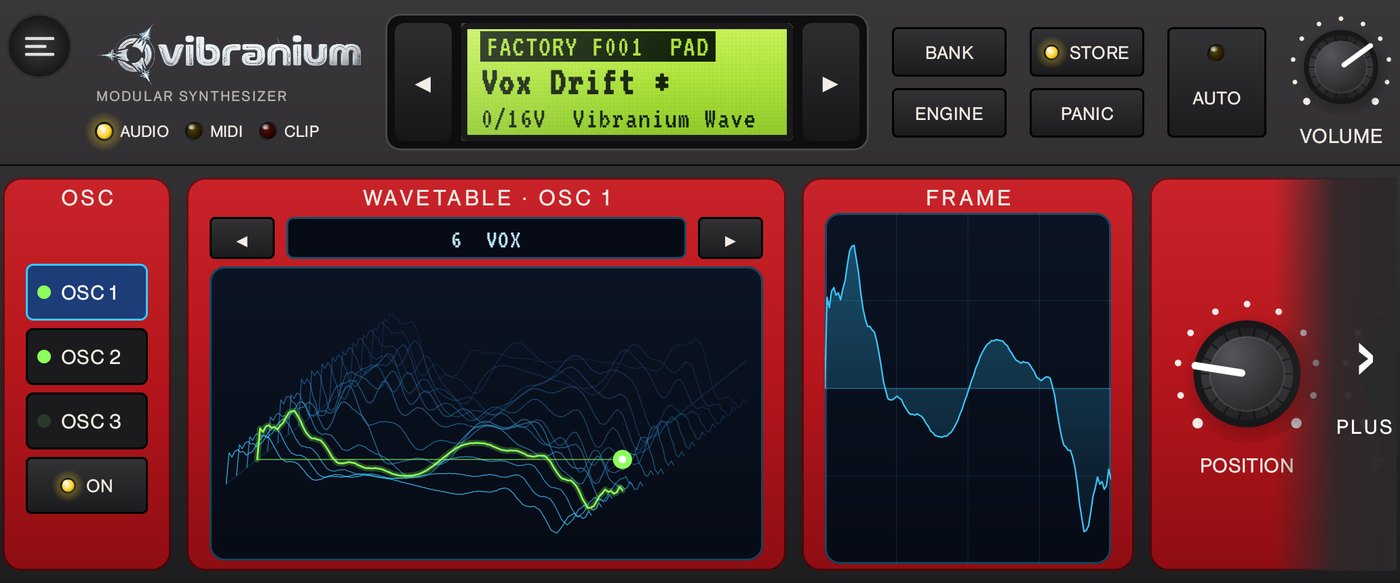
OSC tab, OSC 1 selected: in WAVETABLE, ▶ to 6 VOX (the vowels a-e-i-o-u). Drag your finger in the 3D view, or turn POSITION, while playing a note: each position is another vowel. Leave it around 20 %. The FRAME panel shows the frame being played.
Still on OSC 1, further along the page (› MORE): Pos Env about 50 %. The MOD envelope will slide the position on every note.
Tap OSC 2 then ON: table 5 FORMANT, Position about 30 %, Fine about +9 cents (slight detune), Level about 60 %, Pos Env about 60 %.
End of the OSC page, UNISON: 2 voices, Detune about 30 % to thicken.
OSC tab: OSC 1 and OSC 2 active (green LEDs), table 6 VOX in 3D with the played position in green, and on the right the frame that sounds. (App shown in French.)
Filter and volume
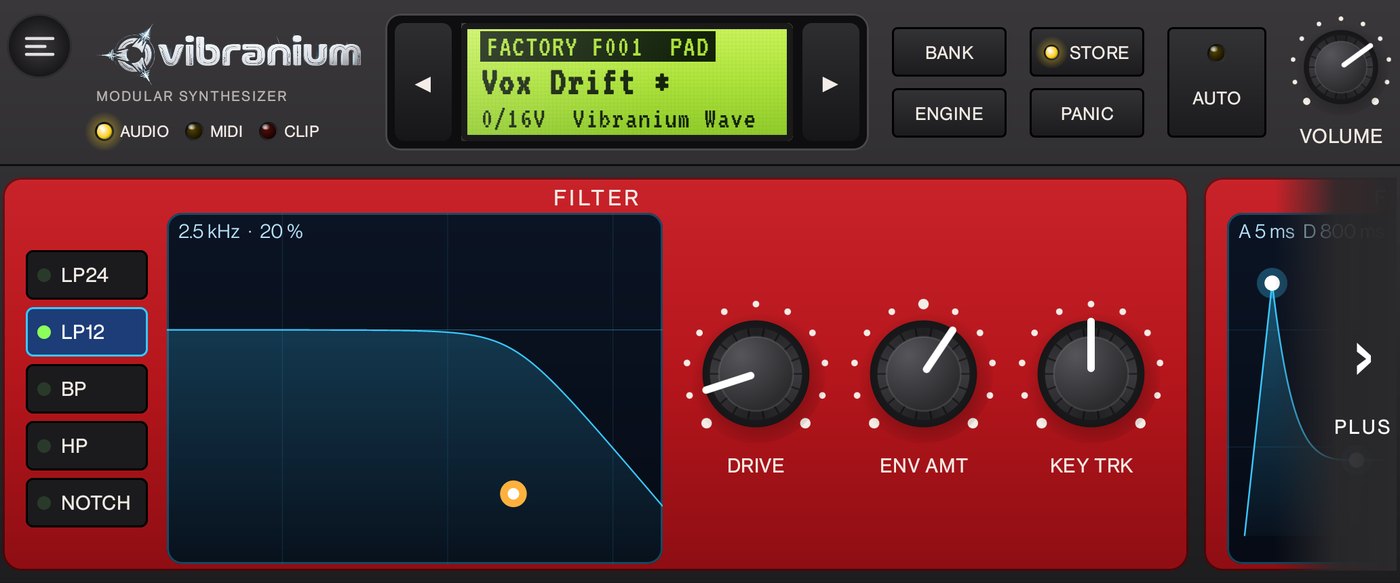
FILTER tab: LP12 mode (softer than LP24). Drag the orange handle of the curve: left/right sets the Cutoff, up/down the resonance. Aim for 2.5 kHz and 20 % (shown at the top of the curve).
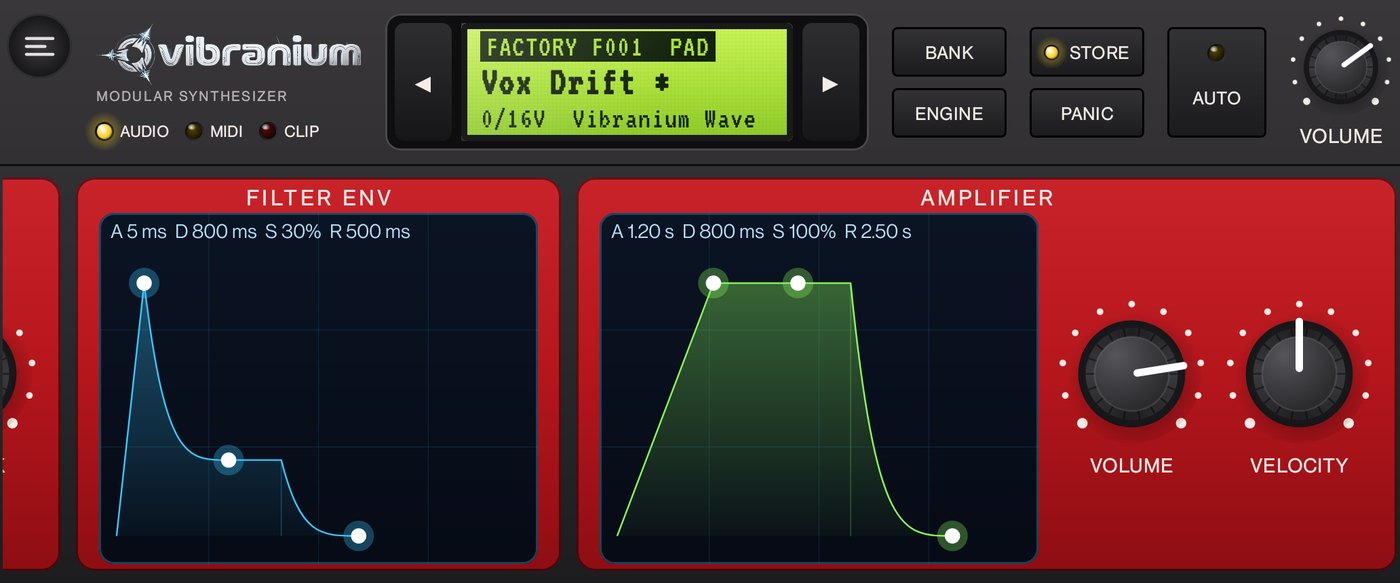
Further along (› MORE), AMPLIFIER: drag the envelope points. Top point to the right for a 1.2 s attack; middle point all the way up (Sustain 100 %); bottom-right point for a 2.5 s release. Values are shown above.
The LP12 filter curve: the orange handle sets cutoff and resonance (2.5 kHz · 20 %).Point envelopes: AMPLIFIER with a slow attack (1.2 s), full sustain and a long release (2.5 s).
Movement
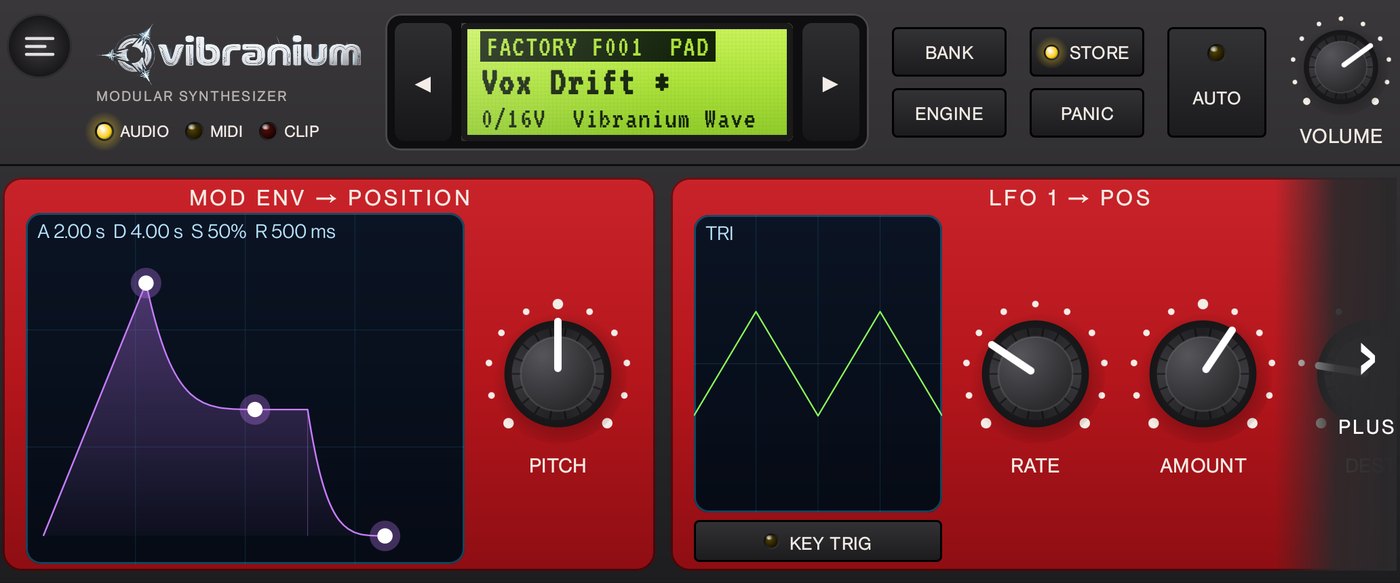
MOD tab, MOD ENV → POSITION: attack 2 s, decay 4 s, sustain 50 %. It sweeps the oscillators' position, scaled by their Pos Env.
LFO 1 → POS: tap the drawing until TRI, Rate about 0.15 Hz, Amount about 25 %, Dest set to POS: a slow back-and-forth that never stops.
FX tab: CHORUS Mix about 30 %; DELAY Type TAPE, Time about 0.45 s, Mix about 20 %; REVERB Size about 80 %, Mix about 40 %.
Hold a chord for several seconds: the vowel opens, glides, then breathes with the LFO. STORE: name Vox Drift, category PAD.
MOD tab: MOD ENV → POSITION (A 2 s, D 4 s, S 50 %) and LFO 1 → POS, triangle, very slow.
“Talking bass” variant: a single VOX oscillator at Octave -1, Pos Env about 80 %, a short MOD ENV (decay 300 ms, sustain 0), Voices set to 1 in VOICE: every note says “wah”. Also try the SYNC, FOLD and RESONANT tables with the same settings: the position does very different things there.
6A techno track in the sequencer PREMIUM
30 min · Multi mode, Drums engine, MIDI sequencer
A techno loop at 130 BPM: kick, clap, hi-hat, bass and a “dub techno” chord with echo. Then we bring it to life by muting and bringing back tracks.
Set up the instruments
ARP/PAT tab › CLOCK: tempo 130 BPM.
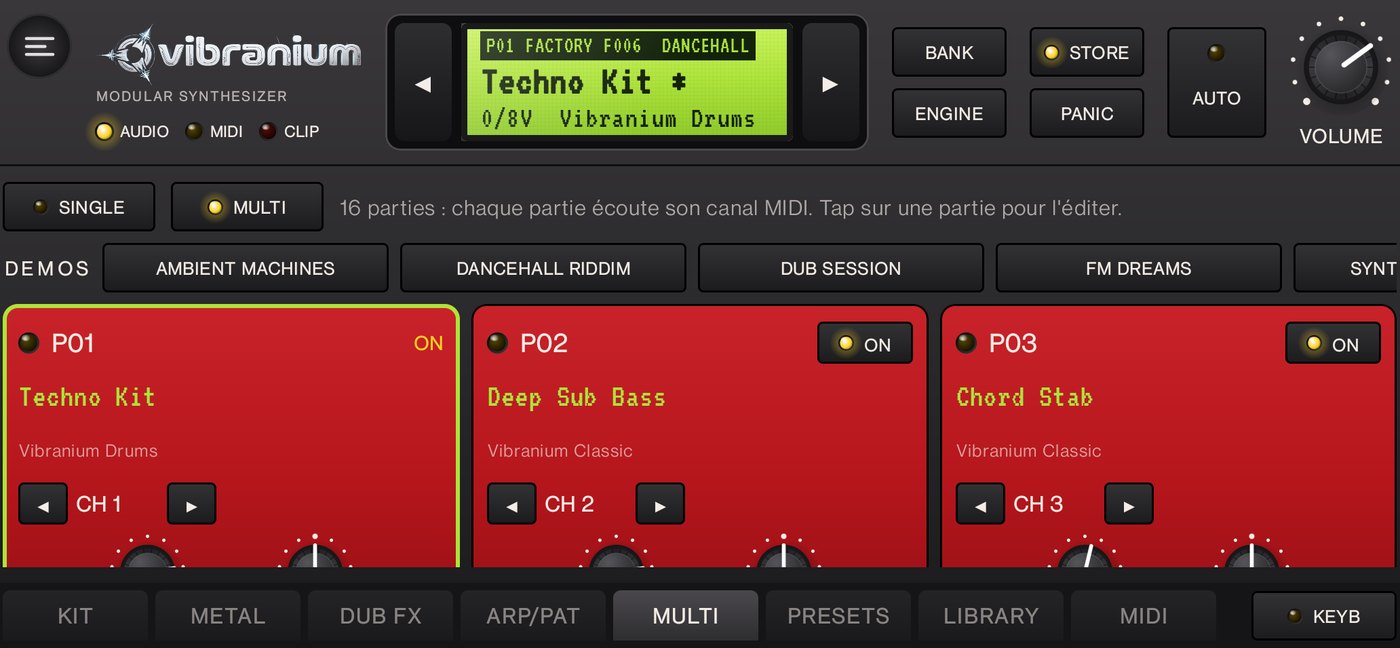
MULTI tab: switch to MULTI. Turn ON parts P01, P02 and P03.
P01 = drums: tap the P01 card to select it, then ENGINE until Vibranium Drums and ◀▶ to the Dancehall 808 kit. KIT tab: KICK Decay about 0.5 s (the 808 rings too long for techno) and Punch about 60 %; set the Dub sends to 0 for a dry sound. Save it (STORE, Techno Kit).
P02 = bass: select P02, load Deep Sub Bass (or your Psy Roll Bass from lesson 3, with the arpeggiator set back to OFF).
P03 = chord: select P03, load Chord Stab. FX tab: DELAY Type TAPE, Time about 0.35 s (dotted eighth at 130 BPM), Feedback about 50 %, Mix about 30 %; REVERB Mix about 30 %.
The three parts of the track in MULTI mode: drums, bass and chord.
Write the loop
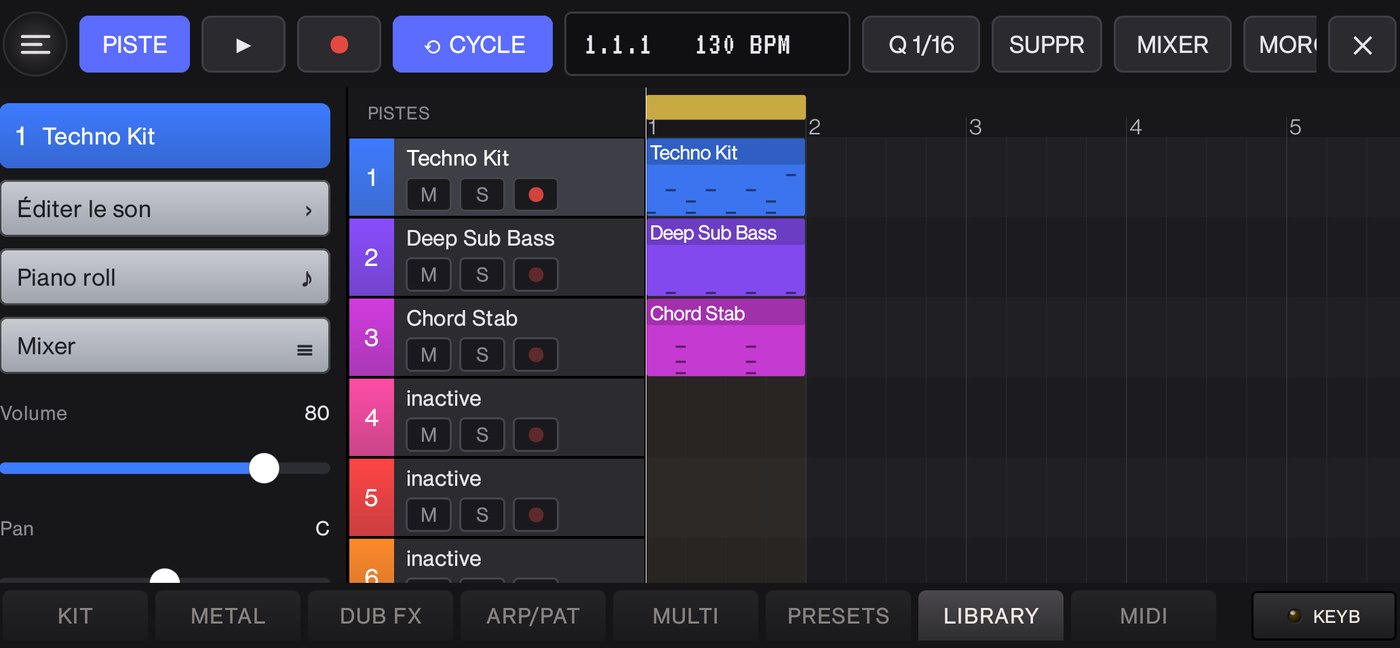
Menu ☰ › MIDI sequencer. On the ruler at the top, drag over bar 1 to set the loop area (yellow) to one bar; ⟲ CYCLE must be on.
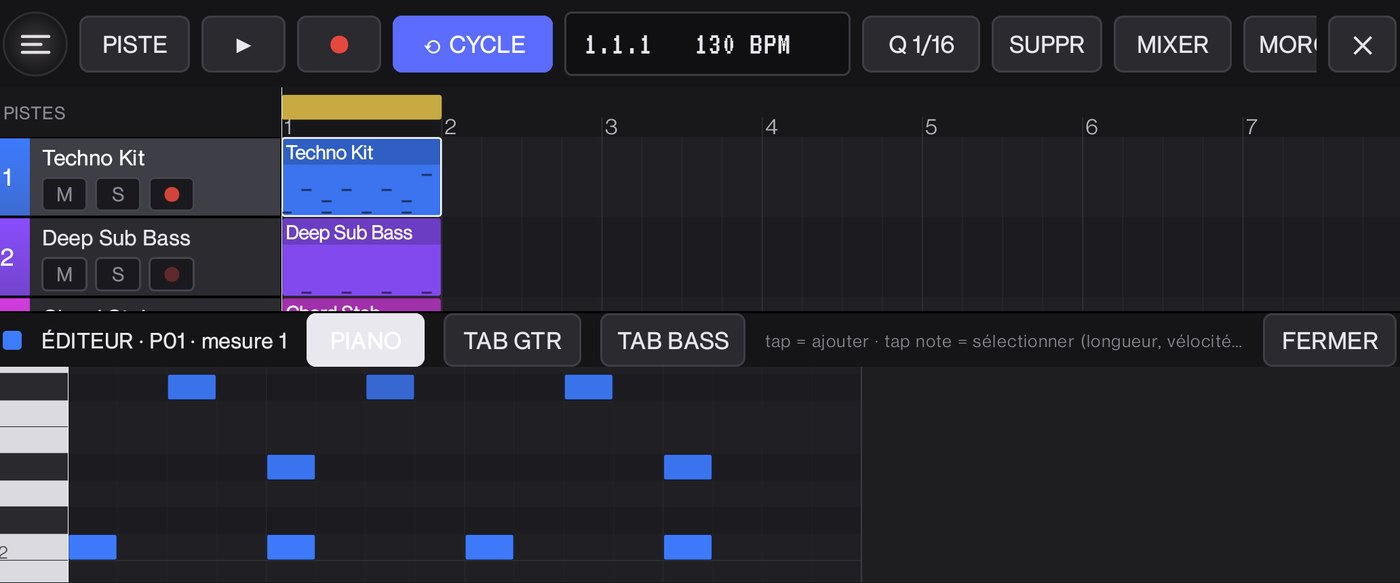
Track 1: tap the empty area of bar 1 to create a region, then double tap it to open the piano roll. Each column is a sixteenth (16 per bar), the C1, C2… markers are on the left. With the Drums kit, the note picks the instrument:
The sequencer: one region per track on bar 1, a one-bar loop (yellow), 130 BPM.
Instrument
Note
Sixteenths to fill (1 to 16)
Kick
C, e.g. C2
1, 5, 9, 13 (every beat: “four on the floor”)
Clap
D#, e.g. D#2
5, 13 (beats 2 and 4)
Closed hi-hat
F#, e.g. F#2
3, 7, 11, 15 (off-beats)
Open hi-hat
A#, e.g. A#2
15, instead of the closed one: a breath at the end of the bar (optional)
Track 1 piano roll: kick on C2 on every beat, clap on D#2 (beats 2 and 4), hi-hat on F#2 on the off-beats.
Tap ►: the drums loop. Vary the hi-hats: select a note, then VEL.− to soften it (every other one softer = groove).
Track 2 (bass): a region on bar 1, then A1 notes on sixteenths 3, 7, 11, 15: the bass answers the kick on the off-beats, length 1/16.
Track 3 (chord): an A minor chord A3 + C4 + E4 on sixteenths 4 and 11, length 1/16. The TAPE echo fills the space between them.
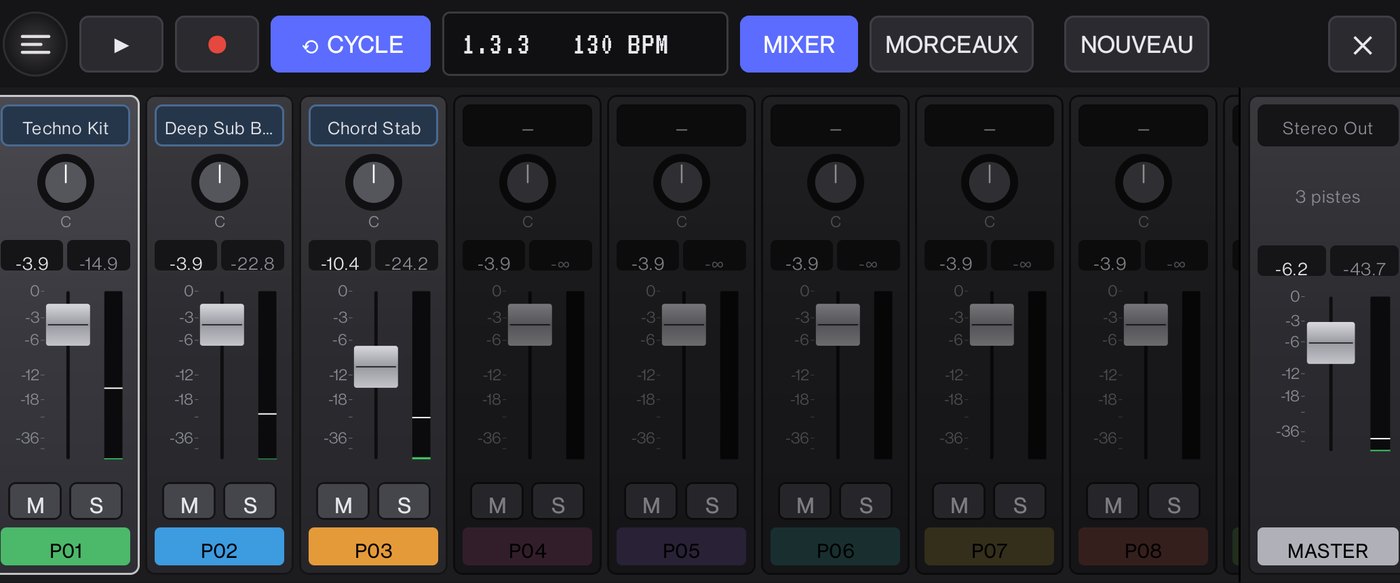
Open MIXER: lower track 3 a little (about −6 dB) and check that no meter turns red.
The mixer during playback: track 3 (chord) is lowered, no meter in the red.
Bring the track to life
Build up: mute every track except the kick with M in the headers, then bring them back one by one every 4 or 8 bars: hi-hat, bass, chord.
The break: mute the kick (M) for 4 bars, leaving the chord and its echo, then bring it back: works every time.
Play on top: select a free track (P04 with a lead sound), tap ● and play the keyboard during the loop; Q 1/16 then tightens the notes.
Make it longer: widen the loop area to 4 bars and create more regions (a bass variation on bar 4, for example).
Save: SONGS, type Techno 130, SAVE. The song keeps the sounds, the mix, the tempo and the notes.
Psytrance variant: tempo 145, the same kick on every beat, and on the bass track your Psy Roll Bass on E1 on sixteenths 2-3-4, 6-7-8, 10-11-12, 14-15-16 (lesson 3).
7Cheat sheet
Style
Tempo
Dotted eighth (DELAY Time)
Dub, reggae
70 to 80 BPM
0.56 to 0.64 s
House
122 to 126 BPM
0.36 to 0.37 s
Techno
128 to 135 BPM
0.33 to 0.35 s
Psytrance
138 to 148 BPM
0.30 to 0.33 s
Formula: dotted eighth = 45 ÷ tempo (in seconds); eighth = 30 ÷ tempo; sixteenth = 15 ÷ tempo.
Drums (Drums engine, any octave): C kick · C# rim · D and E snare · D# clap · F# closed hi-hat · A# open hi-hat · G# percussion · F G A B toms.
To go further, every parameter is described in the manual.